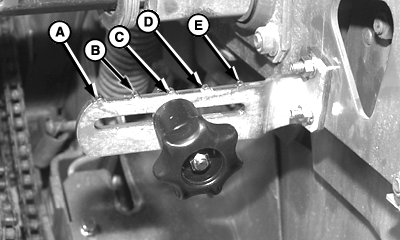
Setting Twine End Wrap DistanceSet Mechanical Twine Guide For End Wrap DistanceNOTE: 466/466S; Equipped with left-hand twine guide only. (See UNDERSTANDING TWINE WRAP TERMS AND SETTINGS in this section.) The twine guide controls twine wrap distance from left-hand end of bale. Twine wrap distance can be adjusted from 89-190 mm (3.5-7.5 in.) at 25 mm (1 in.) increments. For most baling conditions, adjust twine guide to position (B). This setting will position twine end wraps approximately 114 mm (4.5 in.) from end of bale. For dry, slick crops such as straw, coastal Bermuda grass, or flax, increase twine wrap distance to prevent twine from falling off bale. For crops, such as alfalfa, that fill the bale ends well and produce square shoulders, decrease twine end wrap distance to improve bale appearance and reduce bale spoilage. To adjust guide: 1. Loosen knob.2. Move knob as follows:
3. Tighten knob. |
|
AG,OUO6017,1634 -19-04NOV99-1/2 |
|
Set Right-Hand and Left-Hand End Wrap Distance
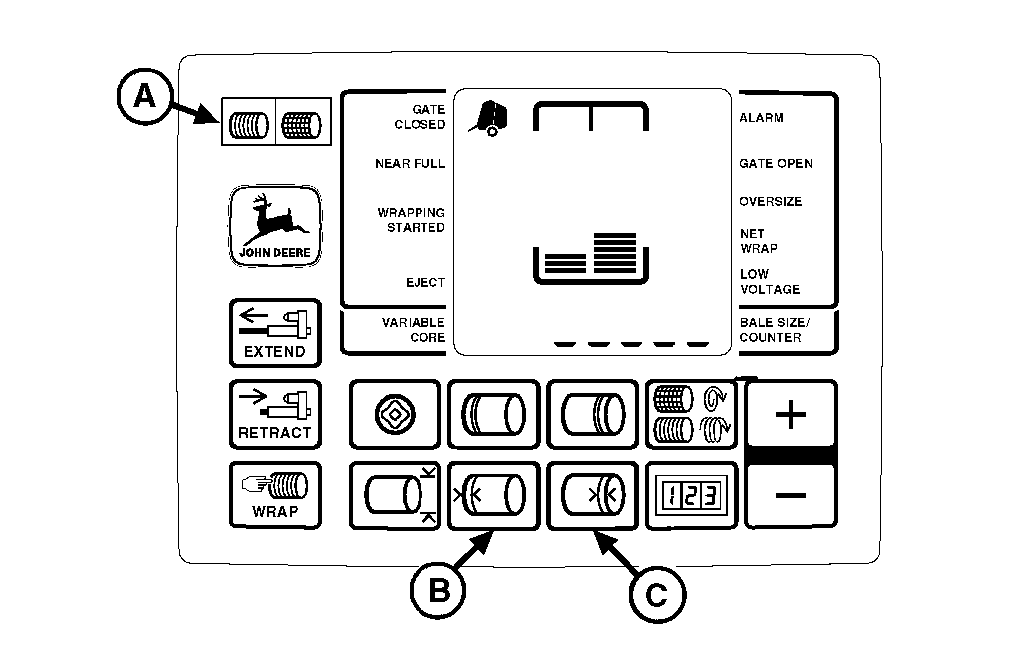
NOTE: To ensure twine placement is controlled by mechanical twine guide, adjust monitor-controller twine end wrap distance 13-25 mm ( 0.50-1 in.) less than mechanical twine guide setting. This adjustment will increase number of end wraps. 1. Turn tractor key to ON position. Do not start tractor engine. Set selector switch toward TWINE symbol (A) to turn monitor-controller ON. 2. Press and hold left-hand (B) or right-hand (C) END WRAP DISTANCE keys. Press PLUS or MINUS keys until desired distance 3-10 in. (0.08-0.25 m) appears in digital display. (End wrap distances are approximate.) To place twine the same distance from the edge on both ends, a slightly different setting may be required for each end. 3. Release END WRAP DISTANCE key to enter setting into memory. Repeat procedure for opposite end of bale. 4. Set monitor-controller selector switch to OFF (centered) position. Turn tractor key to OFF position. Remove key. |
|
AG,OUO6017,1634 -19-04NOV99-2/2 |