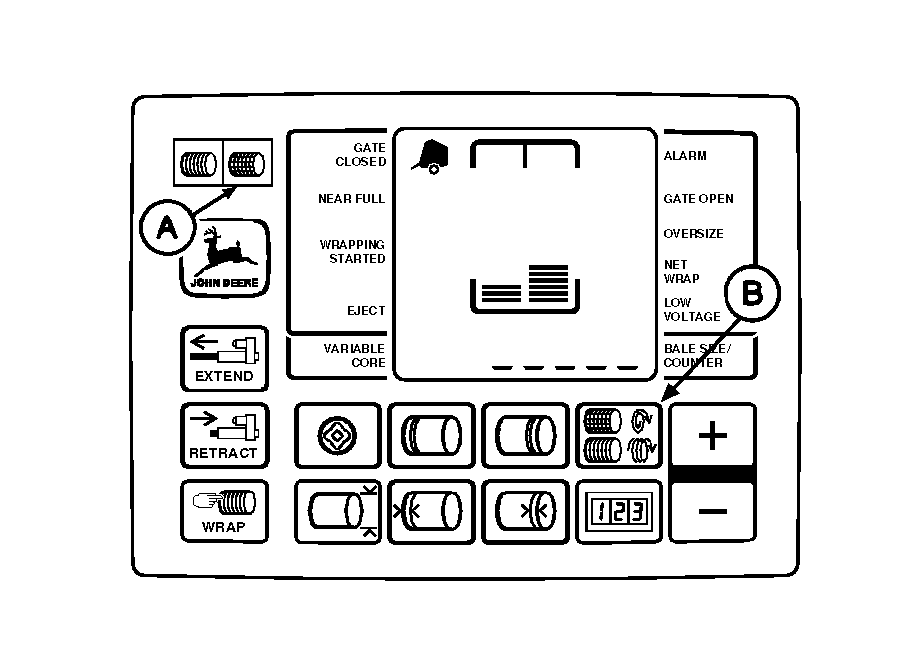
Setting Number of Net Wraps (If Equipped)NOTE: Net wrap settings range between 1.2-5 wraps (in 0.1 wrap increments), with initial setting of two wraps. 1. Turn tractor key to ON position. Do not start tractor engine. Set selector switch toward NET symbol (A) to turn monitor-controller ON. 2. Press and hold NET WRAP key (B). Press PLUS or MINUS keys until desired number of wraps (1.2-5) appears in digital display. 3. Release NET WRAP key to enter setting into memory. 4. Set monitor-controller selector switch to OFF (centered) position. Turn tractor key to OFF position. Remove key. |
|
AG,OUO6017,1635 -19-04NOV99-1/1 |