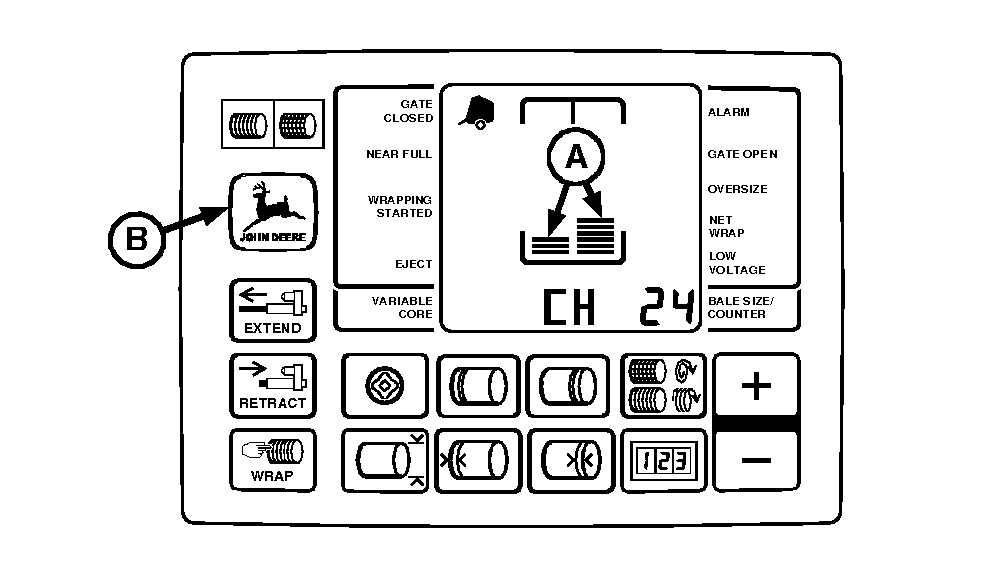
Setting Bale Shape Sensitivity (Advanced Operational Information) (Channel 24)The sensitivity of the bale shape bars (A) is factory set at 3 to dampen sensor signals. The reaction of bale shape bars to actual changes in the bale shape can be adjusted to be very responsive or very dampened. Decreasing the setting makes the bale shape bars less responsive (slower to react) to bale shape changes. Increasing the setting makes the bale shape bars very responsive (fast to react) to crop intake. It may be desirable to increase bale shape sensitivity when rapidly forming bales.
To adjust bale shape sensitivity: 1. Turn tractor key to ON position. Do not start tractor engine.2. Press and hold DEERE key (B) while setting selector switch to TWINE or NET symbol to turn monitor-controller ON. 3. Continue to hold DEERE key and press PLUS key until "CH 24" appears in digital display. Release DEERE key and view current sensitivity setting "(1-5)". 4. Use PLUS key to increase setting, making indicators more responsive. Use MINUS key to reduce setting, making indicators less responsive. 5. Set monitor-controller selector switch to OFF (centered) position, to enter setting into memory. 6. Turn tractor key to OFF position. Remove key. |
|
AG,OUO6017,1643 -19-04NOV99-1/1 |