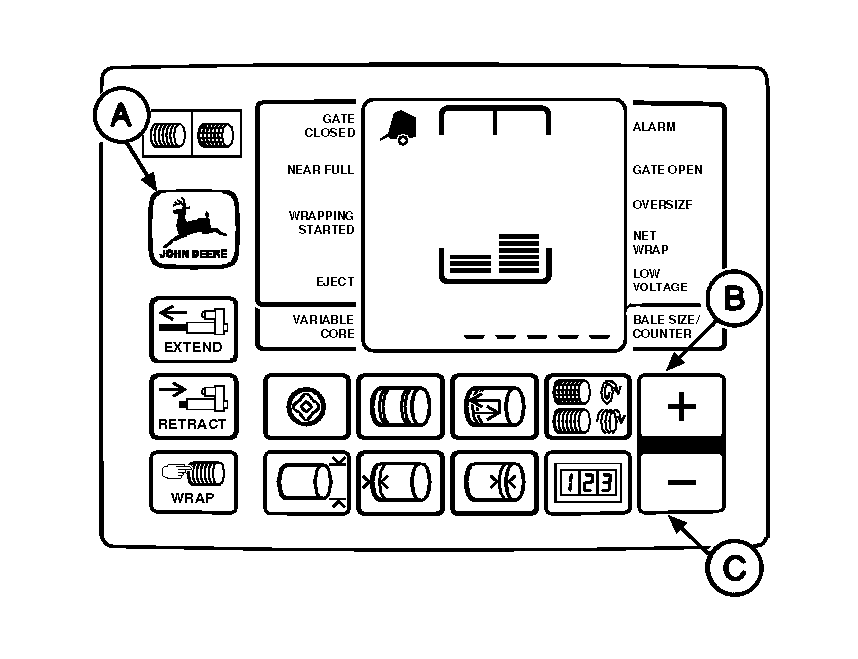
Adjusting Net Wrap Delay (Advanced Operation Information) (Channel 26)The initial setting for net wrap delay is 2 seconds. This provides time to stop forward travel and avoid getting crop between layers of wrap. If the operation requires additional delay before wrapping starts, such as operating on a hillside or baling at high ground speed, net wrap delay can be adjusted from 0 to 8 seconds. To change setting: 1. Turn tractor key to ON position. Do not start tractor engine.2. Press and hold DEERE key (A) while setting selector switch to NET symbol to turn monitor-controller ON. 3. Continue to hole DEERE key and press PLUS key until "CH 26" appears in digital display. 4. Release DEERE key and view current setting. 5. Use PLUS and MINUS keys (B and C) to change net wrap delay to desired setting (0 to 8 seconds). 6. Set monitor-controller selector switch to OFF (centered) position, to enter setting into memory. 7. Turn tractor key to OFF position. Remove key. |
|
AG,OUO6017,1645 -19-04NOV99-1/1 |