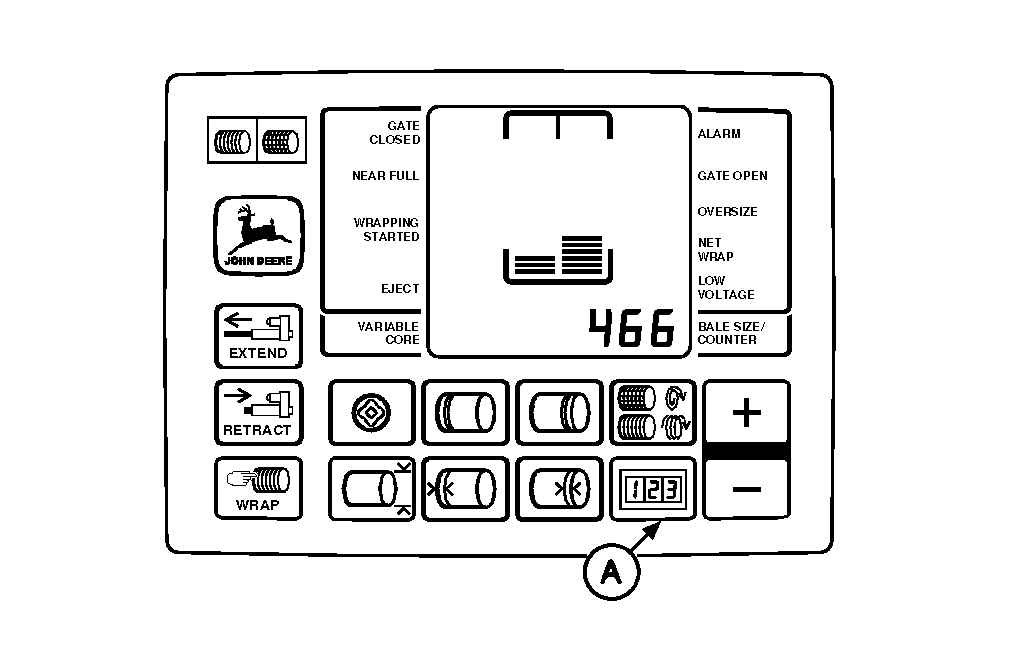
Changing Baler Model ProgramThe monitor-controller software includes two baler model programs-466 and 566. Each program is written specifically for the baler model for which the monitor-controller was originally supplied. When replacing monitor-controller with a new unit, or moving monitor-controller to a different model baler, review and revise the model program if necessary. NOTE: The twine system will not operate correctly unless the displayed model number agrees with the baler model number. To change model program: 1. Turn tractor key to ON position. Do not start tractor engine.2. Press and hold COUNTER key (A) while setting selector switch to TWINE or NET symbol to turn monitor-controller ON; current model setting will show in digital display. 3. Continue holding COUNTER key (A) and press PLUS key to change digital display model number. 4. When desired model number appears in display, release COUNTER key (A). Monitor-controller will go into normal operation, using operating parameters for the selected model. 5. Set monitor-controller selector switch to OFF (centered) position. 6. Turn tractor key to OFF position. Remove key. |
|
AG,OUO6017,1648 -19-04NOV99-1/1 |