Adjusting Twine Cutter to Twine Arm
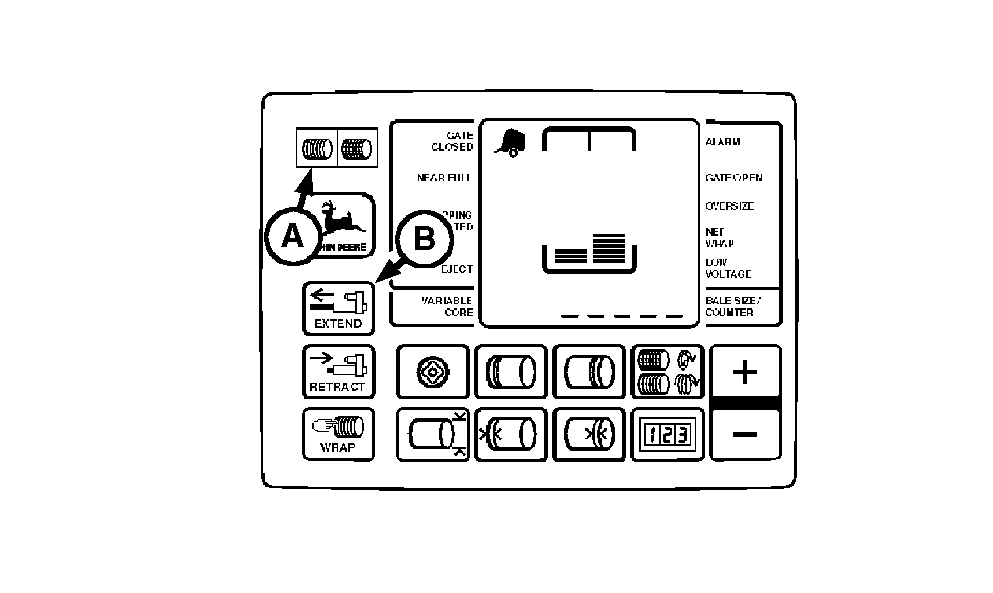
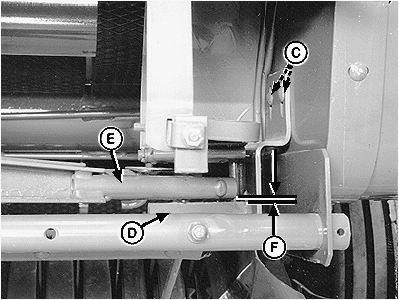
If there is crop material which is holding twine arms from moving freely during twine arm cycle, it is recommended that twine arms be manually positioned to release any "hold" they may have on the crop material. Turn off power to twine arms. This will help to make the unplugging operation easier and prevent twine arms from moving unexpectedly while your hands may be in the path of the twine arms. Stay out of the path of twine arms at all times when power to twine arms is ON. Be careful when working around the knife. It is sharp. NOTE: If equipped with MEGATOOTH ™ pickup; Remove quick-lock pin and rotate left-hand curtain away from front frame. 1. Remove crop material from knife and hex anvil area. 2. Turn tractor key to ON position. Do not start tractor engine. Set monitor-controller selector switch to TWINE symbol (A) to turn monitor-controller ON. 3. Press monitor-controller EXTEND key (B) and move front twine arm tube until centered over hex anvil.
|
|
 CAUTION:
Twine arms can move unexpectedly when twine arm power is on. Stay out of the path of twine arms at all times when twine arm power is on. During service or adjustment procedures for twine arms or twine cutter mechanism, turn off power to twine arms BEFORE placing your hands in the path of twine arm travel.
CAUTION:
Twine arms can move unexpectedly when twine arm power is on. Stay out of the path of twine arms at all times when twine arm power is on. During service or adjustment procedures for twine arms or twine cutter mechanism, turn off power to twine arms BEFORE placing your hands in the path of twine arm travel.


|
MEGATOOTH is a trademark of Deere & Company | AG,OUO6017,1736 -19-10NOV99-1/2 |
|
4.
Set monitor-controller selector switch to OFF (centered) position. Turn tractor key to OFF position. Remove key.
5. Loosen nuts (C). 6. Adjust twine cutter assembly so clearance (F) between knife hex anvil (D) and front twine arm tube (E) is specifications. Twine cutter bracket should be level (parallel with bottom edge of frame). Specification
7. Tighten nuts (C). 8. If rear twine arm contacts bottom side of knife support and minimum clearance in step 6 is obtained, bend twine cutter bracket so hex anvil is parallel to twine arm. 9. Check knife adjustment (See CHECKING KNIFE ADJUSTMENT in this section.) NOTE: If equipped with MEGATOOTH™ pickup; Rotate curtain toward front frame and fasten with quick-lock pin. |
AG,OUO6017,1736 -19-10NOV99-2/2 |