Testing Gate Latch and Oversize Bale Switches-Monitor-Controller Assisted Test (Channels 11, 12, and 13)Microswitch position and operation can be checked by using the monitor-controller diagnostic channels. 1. Start tractor engine.2. Press and hold DEERE key (A) while setting selector switch to TWINE or NET symbol to turn monitor-controller ON. 3. Continue to hold DEERE key and press PLUS key until digital display shows desired channel. 4. Release key and view reading (gate closed). NOTE: Tension arm must be fully raised for oversize bale switch to be closed. 5. Open gate and view reading or listen for tone. |
|
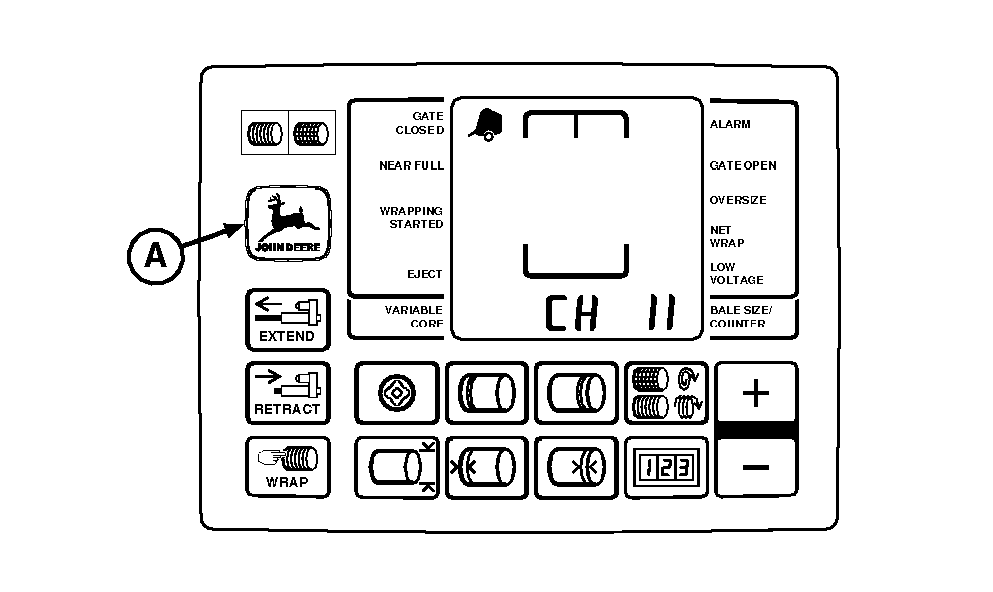
| DIAGNOSTIC CHANNEL | FUNCTION | GATE CLOSED READING | GATE OPEN READING |
|---|---|---|---|
| 11 | Oversize Bale Switch | 12 (Switch Open) | 00 (Zero) (Switch Closed) (Tone) |
| 12 | Right Gate Switch | 00 (Zero) (Switch Closed) | 12 (Switch Open) (Tone) |
| 13 | Left Gate Switch | 00 (Zero) (Switch Closed) | 12 (Switch Open) (Tone) |
|
6. If readings are not as shown, adjust switch position and test again. (See ADJUSTING OVERSIZE BALE SWITCH and ADJUSTING GATE LATCH SWITCHES in this section.) 7. If switch adjustment does not produce normal readings:
|
|
|
BALETRAK PLUS is a registered trademark of Deere & Company | AG,OUO6017,1754 -19-12NOV99-1/2 |
|
|
AG,OUO6017,1754 -19-12NOV99-2/2 |