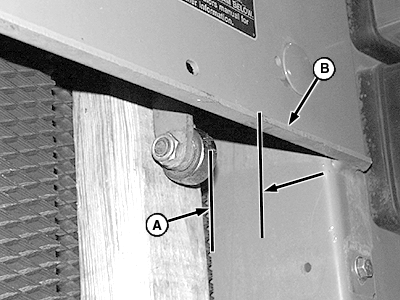
Adjusting Bale Shape Sensor (Channels 07 and 09-With Sound)1. Put a board approximately 51 x 102 x 457 mm (2 x 4 x 18 in.) between roller bearing and belt as shown.2. Position board to hold bale shape sender arm so rear of roller bearing is 62 mm (2-7/16 in.) (A) from rear edge of panel (B). 3. Press and hold DEERE key (C) while setting selector switch to TWINE or NET symbol to turn monitor-controller ON. 4. Continue to hold DEERE key (C) and press PLUS key (D) until "CH 07" is displayed to adjust right side, or until "CH 09" is displayed to adjust left side. 5. Release DEERE key (C) to display sensor count.
|
|

EX,566J,AU -19-06SEP97-1/3 |
|
6.
Remove rolling thread cap screw (B). Rotate shield (A) away from baler.
|
|

EX,566J,AU -19-06SEP97-2/3 |
|
7.
Loosen sensor mounting hardware. Rotate sensor (A) until number "176" is displayed and a steady tone sounds.
8. Tighten sensor mounting screws. Tighten to specifications. Do not overtighten. Overtightening will change sensor position and alter adjustment. Specification
9. Rotate shield toward baler and fasten with mounting cap screw. 10. Set monitor-controller selector switch to OFF (centered) position. Turn tractor key to OFF position. Remove key. |
|

EX,566J,AU -19-06SEP97-3/3 |