Installing BALETRAK PLUS® Monitor-Controller in ComfortGard™ Cab1. Remove the top two plugs from lower right-hand front cab post.2. Install angle (A) to cab post. Fasten with two M10 x 20 mm flange-head cap screws. 3. Install monitor-controller strap (B) to angle (A). Fasten with M10 x 35 mm cap screw (C), washer (D) and flange nut (E).
|
|

|
BALETRAK PLUS is a registered trademark of Deere & Company | EX,566V,J1 -19-08DEC97-1/3 |
|
4.
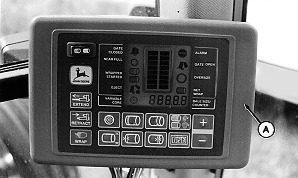
Put monitor-controller (A) pivot bracket on top of mounting bracket. Fasten with M6 x 16 mm cap screw.
5. Route harness along right-hand side of cab, away from operating levers, and toward the rear of cab.
|
|
EX,566V,J1 -19-08DEC97-2/3 |
|
6.
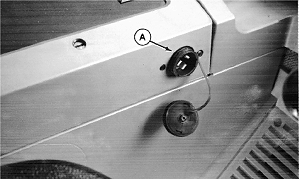
Connect harness power plug to convenience outlet (A).
7. Route harness through grommet in back of cab, or drill a 44 mm (1-3/4 in.) diameter hole in rear wall if required.
|
|
EX,566V,J1 -19-08DEC97-3/3 |