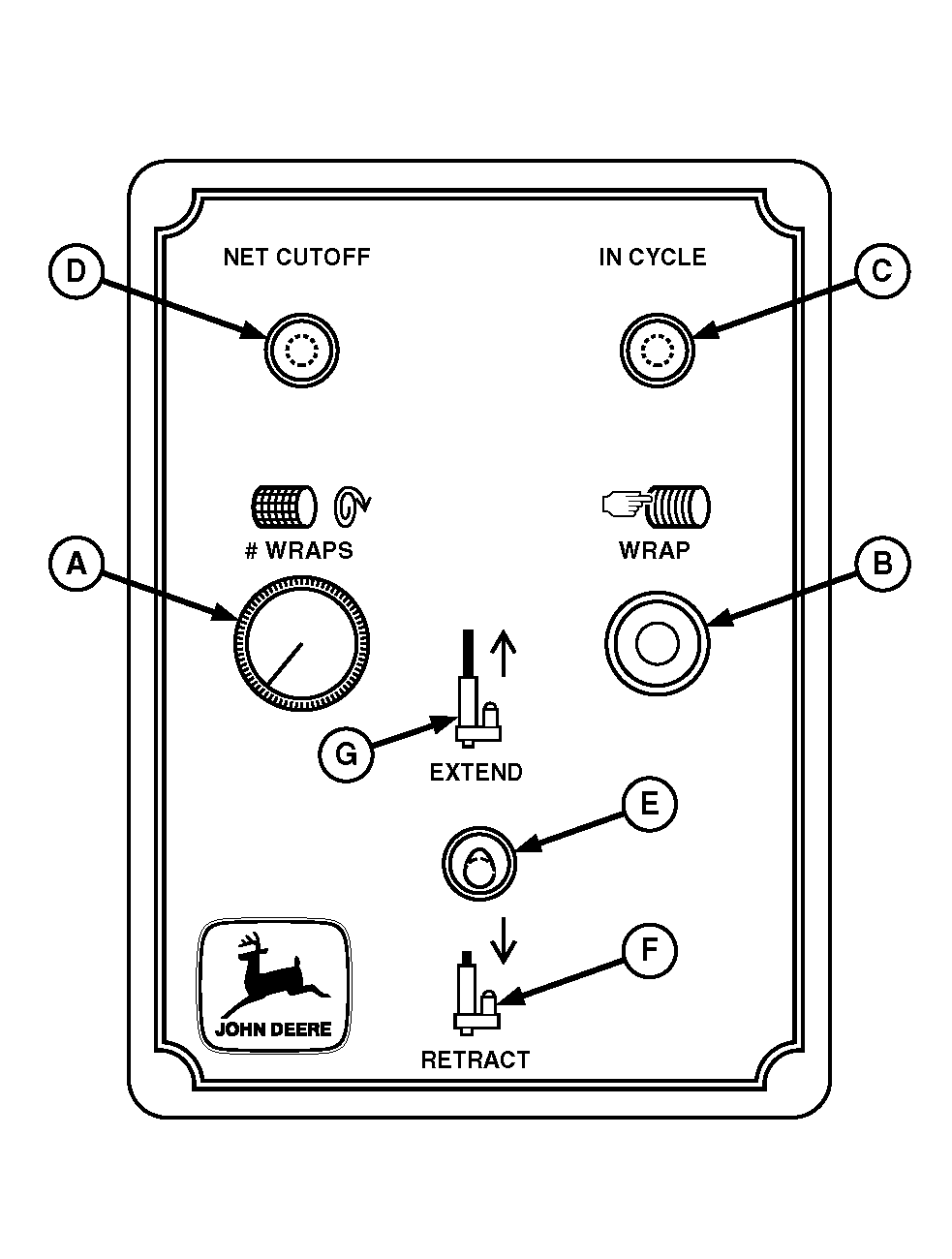
Operating Net Wrap ControlIMPORTANT: Net wrap cycle should only be started after stopping forward travel and baling. If cycle is started while baling, net wrap material will be wrapped between crop layers. Adjusting Number of Wrap LayersTurn adjustment knob (A) as follows:
Start with knob adjusted halfway (12:00 o'clock position), then wrap a test bale to see if further adjustment is needed. Halfway adjustment should equal 1.5 to 2 net wraps. Activating Automatic Wrap CycleNOTE: Keep engine speed constant while wrapping. Varying engine speed will affect number of net wraps applied to the bale. Momentarily press WRAP switch (B). IN CYCLE indicator (C) will light and stay on until actuator returns to home position (extended actuator). When preset number of wrap layers have been applied, NET CUTOFF indicator (D) will show the following:
If either of the last two conditions occurred, disengage PTO, shut off tractor and investigate the problem. After problem is located and fixed, repeat the Automatic Wrap Cycle procedures. |
|
AG,OUMX005,1313 -19-18MAR00-1/2 |
|
Using Manual Override Switch
Manual override switch (E) can be used to wrap bale in the event automatic cycle does not operate. Move switch lever rearward to RETRACT position (F), pause 4 to 5 seconds for 1.5 to 2 net wrap layers to feed out net and wrap bale. Move switch lever forward to EXTEND position (G) to move actuator to cutoff and home positions. Actuator home position is fully extended. When preset number of wrap layers have been applied, NET CUTOFF indicator (D) will show the following:
If either of the last two conditions occurred, disengage PTO, shut off tractor and investigate the problem. After problem is located and fixed, repeat the wrap cycle procedures. If manual override is used to retract the actuator during service operations, be sure to extend actuator to home position before baling. Failure to do so, may result in net being fed into the baler. |
|
AG,OUMX005,1313 -19-18MAR00-2/2 |