Checking and Adjusting Net Wrap Switch
1. Turn tractor key to ON position. Do not start tractor engine. 2. Momentarily press WRAP switch to cycle net wrap actuator. Knife at home (forward) position. 3. Turn tractor key to OFF position. Remove key. Disconnect net wrap controller power plug from tractor convenience outlet. 4. Open net wrap cover. 5. Clean area around switch area. |
|
 CAUTION:
Be careful when working around knife. It is sharp.
CAUTION:
Be careful when working around knife. It is sharp.

AG,OUO1078,7 -19-11OCT99-1/3 |
|
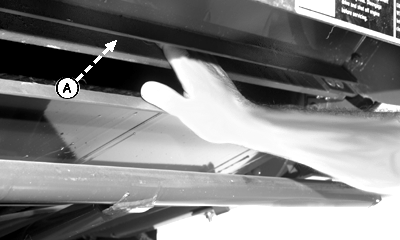
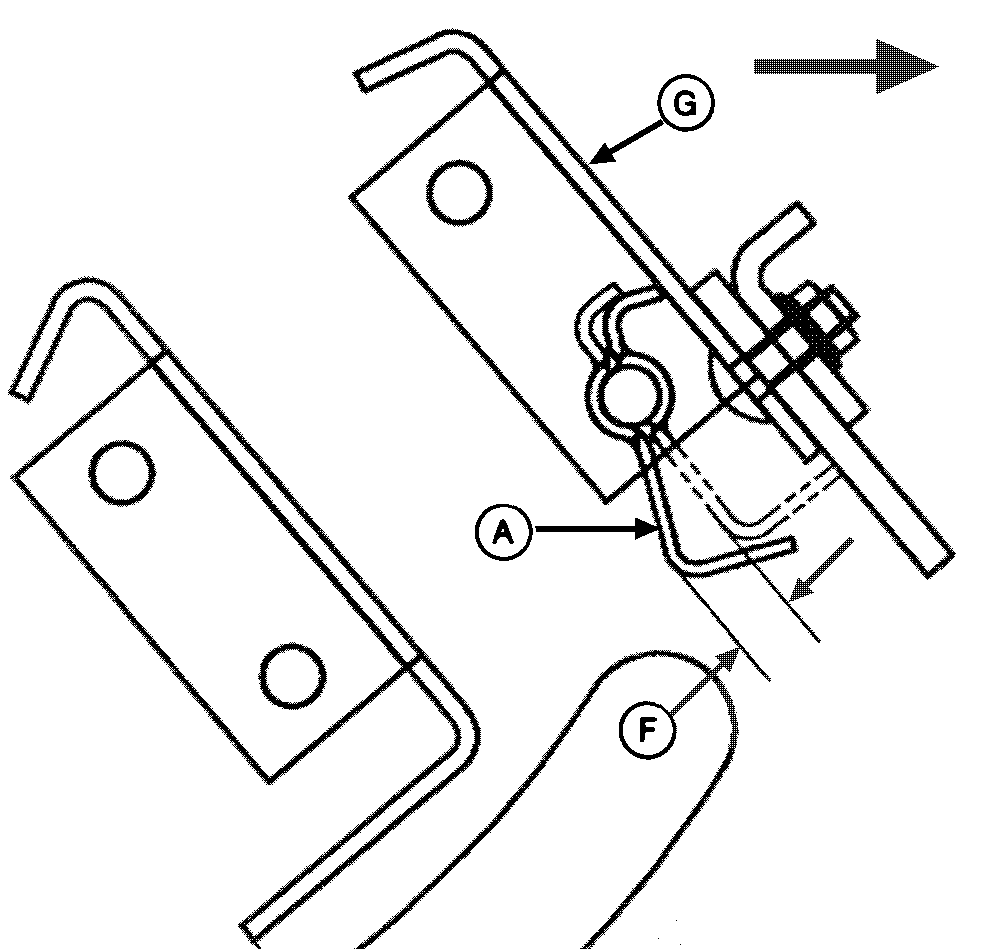
6. Push cutoff channel (A) forward and release. Distance (F) should meet specifications. Make sure it moves forward and returns freely . (See CHECKING CUTOFF INDICATOR CHANNEL TRAVEL in this section.) Specification
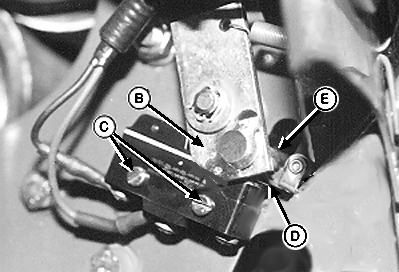
If switch arm pin (E) is not between cutoff channel and rubber flap, dimension (F) will be less than specification. Any binding can cause false reading on controller. 7. Locate and correct channel or switch arm (B) binding before proceeding. The most likely causes of binding are contact between:
8. Push cutoff channel (A) fully forward and listen for switch to "click." Release cutoff channel (A) and listen for another "click." 9. If either "click" cannot be heard, adjust switch as follows: a. Loosen switch mounting screws (C). b. Move switch until switch lever (D) is depressed as far as possible by pin (E) on switch arm (B). Avoid switch lever contact with switch body to prevent bending of switch lever. Tighten mounting screws (C).
|
|
AG,OUO1078,7 -19-11OCT99-2/3 |
|
c. Check adjustment by pushing cutoff channel (A) fully forward and listening for switch to "click". Release cutoff channel (A) and listen for another "click".
10. Close net wrap cover. IMPORTANT: Momentarily press WRAP switch to return net knife arms to home position. If this procedure is not followed, net will be fed continuously during the next bale. 11. Connect net wrap controller power plug to tractor convenience outlet. Turn tractor key to ON position. 12. Momentarily press WRAP switch to cycle net wrap actuator. Knife at home (forward) position. 13. Turn tractor key to OFF position. Remove key. |
AG,OUO1078,7 -19-11OCT99-3/3 |