Digital Display - Initial Setup (Matching with Tractor)
NOTE: Data indicated by digital display depend on the tractor configuration.
Adjustments can be done for:
- Tire size
- PTO speed (540/540E or 540/1000 rpm)
- Transmission type (e.g. for 5GL 24/24 transmission)
- Front PTO
- 2WD/4WD
If one of these factors changes (e.g. tire size), the program number must also be changed. (Entering the corresponding number in relevant control field).
Refer to the chart below for the appropriate program number.
EXAMPLE - For setup of PTO from tractors with mechanical transmission or Power Reverser transmission:
540 rpm PTO only (Mechanical reverser) - Appropriate program number = 10
EXAMPLE - For setup of the tire size :
New tire size 380/70R20 - Appropriate new program number = 263
Changing the program number:
-
AGCPTJD0351-UN-10JUL13
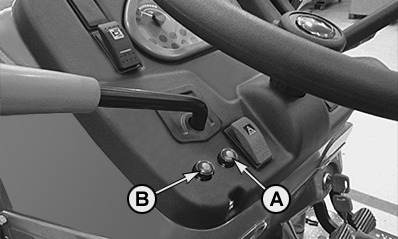
Accessing the initial setup menu: Press and hold the buttons (A) and (B) simultaneously, then turn key switch in ON position.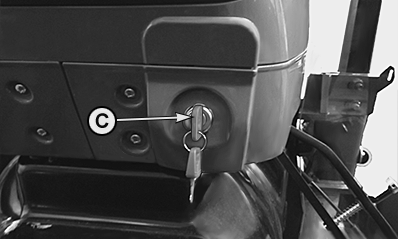
AGCPTJD0352-UN-10JUL13 -
Tire Size: After entering the initial setup menu the digit (D) flashes. Press button (B) to choose the digit and confirm it by pressing button (A).
PULX001626-UN-25SEP08Rear Tires
Program number (Speed parameters)
30 km/h (18,64 mph)
40 km/h (24,85 mph)
5GV-5GN-5GF
5GL-5GV-5GN-5GF
320/70-R20
11.2-R20
280/85-R20
361
287
360/70-R20
12.4-R20
320/85-R20
341
271
380/70 R 20
13.6 R 20
440/65 R20
340/85 R 20
331
263
320/70-R24
11.2-R24
280/85-R24
325
258
360/70 R 24
12.4 R 24
420/65 R24
320/85 R 24
311
247
9.5-R28
250/85-R28
313
249
380/70 R 24
13.6 R 24
440/65 R24
340/85 R 24
299
237
320/70-R28
11.2-R28
280/85-R28
297
236
480/65-R24
290
230
420/70-R24
14.9-R24
380/85-R24
287
228
360/70-R28
12.4-R28
320/85-R28
285
226
380/70-R28
13.6-R28
340/85-R28
275
219
480/70-R24
16.9-R24
420/85-R24
13.6-R28
272
216
480/65-R28
268
213
420/70-R28
14.9-R28
380/85-R28
263
209
420/70-R30
14.9-R30
380/85-R30
253
201
480/70-R28
16.9-R28
420/85-R28
252
200
12.4-R36
320/85-R36
244
194
540/65 R30
243
193
480/70-R30
16.9-R30
420/85-R30
241
191
480/70-R34
16.9-R34
420/85-R34
225
179
18.4-R26
249
198
18.4-R34
13.6-R38
220
175
16.9-R38
213
170
23.1 - 26
222
176
18.4-R30
230
183
-
Km/h or mph mode: Set km/h or mph mode (E) and confirm by pressing button (A).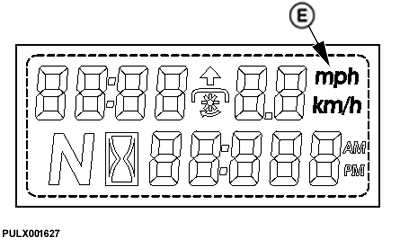
PULX001627-UN-25SEP08 -
PTO/mechanical transmission or PowrReverser transmission: Enter the value (F) and confirm by pressing button (A).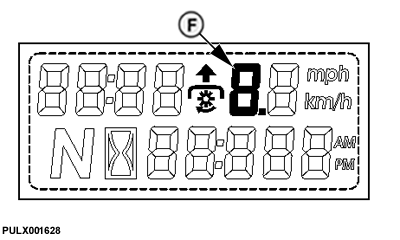
PULX001628-UN-25SEP08Value
PTO Version
Power Reverser
1
540 rpm
x
2
540 - 540E rpm
x
3
540 - 1000 rpm
x
4
540 rpm
−
5
540 - 540E rpm
−
6
540 - 1000 rpm
−
-
Front PTO: Set the front PTO value to 4 8 5.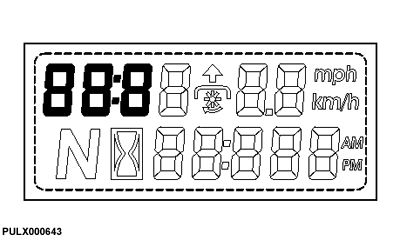
PULX000643-UN-30JUL08Press button (B) to select the digit and confirm with button (A).
-

PULX000644-UN-19SEP08
2WD or 4WD: Choose ”on” if tractor is equipped with hydraulically actuated four-wheel drive.
PULX000646-UN-19SEP08Choose ”OF” if tractor is equipped with two-wheel drive or mechanically actuated four-wheel drive.
Confirm with button (A).
-
After the last confirmation the display will show ”OFF”.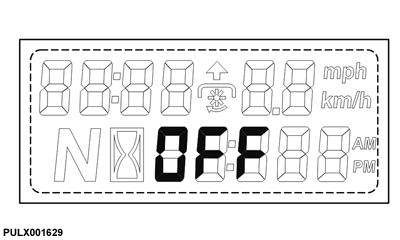
PULX001629-UN-25SEP08Turn the key switch to OFF, program change procedure completed.
|
OULXBER,00024DD-19-20141023 |