Hitch Remote Control (EHS II)
AGCPTJD0125-UN-27MAY13
Hitch Remote Control, 5V, 5N & 5F (if equipped)
AGGCJD0016-UN-29SEP15
AT15997-UN-10OCT06
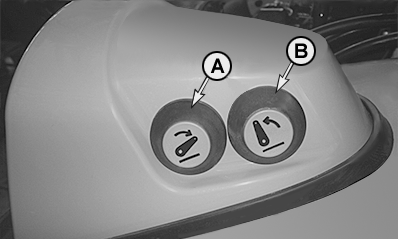
A - Remote control button, raise hitch
B - Remote control button, lower hitch
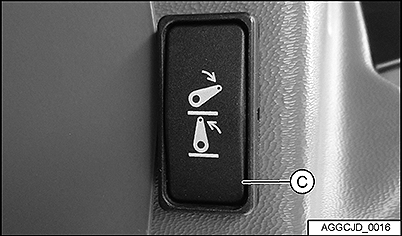
C - Raise/lower switch
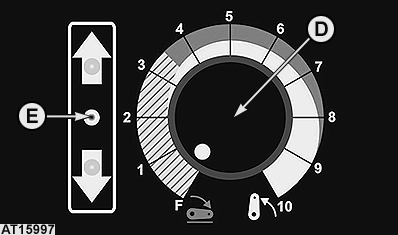
D - Depth control switch
E - Hitch movement indicator LED (hitch stop)
Two external buttons (A) and (B) allow the hitch to be operated from outside the cab. Pressing one of these buttons for the first time deactivates the EHS system (hitch does not move).NOTE: Transport lock switch must be deactivated.
When pressing one of the remote control buttons again, the hitch begins to move in the desired direction and the hitch movement indicator LED (E) goes on or starts flashing. LED remains flashing after the hitch has stopped, indicates that a diagnostic trouble code is active. See ““Hitch, Diagnostic Trouble Codes”” in Section “Troubleshooting”.
NOTE: To reactivate the hitch control via EHS II panel, press the raise/lower switch (C) (lower position) or turn the depth control switch (D) slowly to the left or to the right until the hitch movement indicator LED (E) is OFF or stops flashing.
 CAUTION: Stay clear of three-point hitch lift range when operating
the remote control. Apply parking brake before lifting the implement.
CAUTION: Stay clear of three-point hitch lift range when operating
the remote control. Apply parking brake before lifting the implement.
|
OULXBER,0002500-19-20151002 |