Lighting System - Egress Light
Activate the egress light function
LX1045595-UN-24JAN11
LX1045596-UN-24AUG10
LX1045594-UN-24AUG10
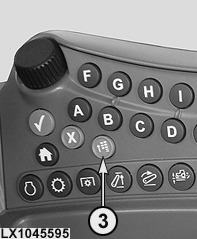
3 - Menu Button
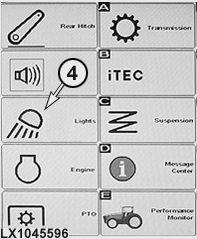
4 - Softkey, Main Page of Lighting System
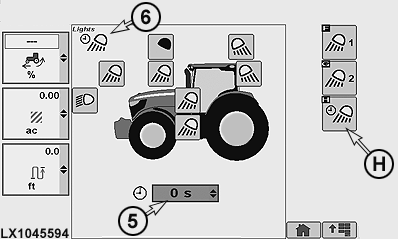
5 - Drop-Down Box, Duration of Lighting
6 - Egress Light Icon
H - Softkey, Egress Light
When completing a journey with the low-beam headlights or worklights switched on for longer than 10 seconds, move the light switch to "0" position and switch off the ignition. Egress lights come on automatically when the ignition is turned off.
If headlights or worklights were switched off 5 minutes before the ignition, the egress light function is de-activated (egress lights do not come on when the ignition is turned off).
IMPORTANT: If headlights have been in operation (low-beam or high-beam) for more than 10 seconds before the ignition is turned off, the egress light function activates only the low-beam headlights. (This is a road safety feature to prevent other road-users from being dazzled by the worklights.)
If worklights have been in operation for more than 10 seconds before the ignition is turned off, the egress light function activates all the selected lights.
NOTE: The egress light function can be de-activated by briefly turning the light switch or ignition on and off.
Egress light - Select lights and adjust duration of lighting
NOTE: Any lights switched on at the time of configuration play no role in determining how the egress light is configured.
Access the main page of lighting system at button (3) and softkey (4). Content of main page depends on how the tractor is equipped.
Access the egress light at softkey (H); the relevant icon (6) appears. Select lights and use drop-down box (5) to set the duration they stay on between 0 and 300 seconds.
|
OULXA64,00025FC-19-20130214 |