Change Transmission/Hydraulic Oil and Oil Filters (Tractors with AutoPowr™/IVT™)
LX1053395-UN-05MAR12
LX1053396-UN-05MAR12
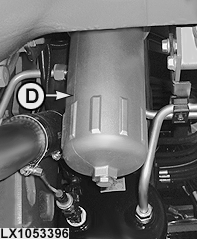
Hydraulic Oil Filter
LX1053397-UN-05MAR12
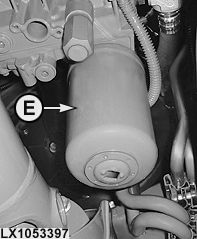
Transmission Oil Filter
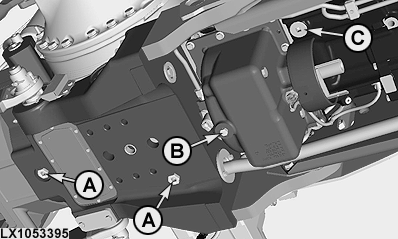
A - Drain Screw in Differential Housing
B - Drain Screw in Front-Wheel Drive Clutch
C - Drain Screw in Transmission Housing
D - Hydraulic Oil Filter
E - Transmission Oil Filter
-
Start the engine and operate several hydraulic functions so that the oil heats up.
-
Park tractor so that it is level. Lower draft links, front loader, front implements and other implements that draw oil from the transmission.
-
Stop the engine and remove the key.
-
Engage the park lock.
-
Take out drain screws (A), (B) and (C) and trap the oil in a suitable container. For capacities, see Specifications.
NOTE: If equipped, remove the swinging drawbar.
After draining the oil, put new seal rings on drain screws (A), (B) and (C) and tighten them.
-
Unscrew hydraulic oil filter (D) and transmission filter (E).
-
Coat sealing rings of new filter elements with grease and screw in filter elements.
Use original John Deere filter elements only!
IMPORTANT: Always replace both filters at the same time. Never change one only.
-
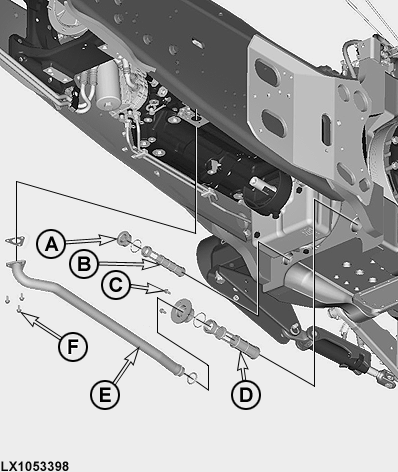
LX1053398-UN-05MAR12Intake Screens on Tractors with IVT™
A - Drain Screw (50 N·m; 37 lb.-ft.)
B - Intake Screen
C - 2 Screws (37 N·m; 27 lb.-ft.)
D - Intake Screen
E - Suction Line
F - 3 Screws (18 N·m; 13 lb.-ft.)
Take out screws (F) and remove intake line (E). Remove screws (C) and drain screw (A). Remove intake screens (B) and (D) and clean them with fuel.Clean the area where the two intake screens are installed.
-
Reinstall all parts as shown and tighten screws to specified torque.
IMPORTANT: Before installing, replace all seals and coat them with oil.
-
Check if drain screw (A) is seated correctly and tighten to 50 Nm (37 lb.-ft.).
-
Add new transmission/hydraulic oil to the transmission case. For capacities, see Specifications.
Check the oil level
Run the engine briefly and operate several hydraulic functions. Stop the engine.
Wait for 10 to 15 minutes before checking the oil level. It should be between the minimum and maximum mark on the sight-glass. If not, correct oil level.
|
OULXA64,0002656-19-20120726 |