iTEC™ - Description, Controls and Functions
LX1045704-UN-13JUL10
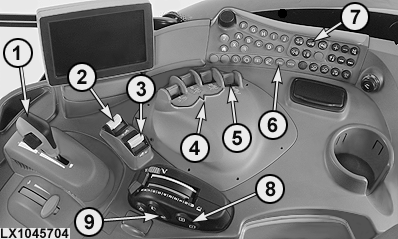
Right Console with Selector Lever for AutoPowr™/IVT™ Transmission
LX1045703-UN-13JUL10
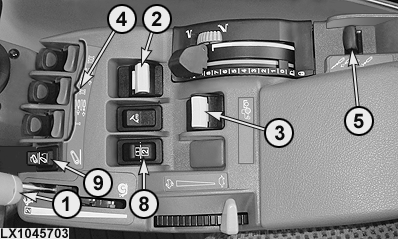
CommandARM™ with Selector Lever for AutoPowr™/IVT™ Transmission
LX1057772-UN-15NOV12
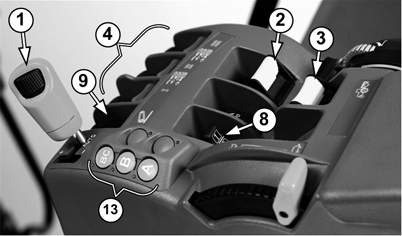
CommandARM™ with Selector Lever for DirectDrive Transmission

LX1045710-UN-26JUL10

LX1045711-UN-26JUL10
LX1045709-UN-26JUL10
LX1045712-UN-18AUG10
 CAUTION: Do not use iTEC™ to operate front loaders. Make
sure that the front loader mode is de-activated on the CommandCenter™
page for selective control valves. See Set Front
Implement or Front Loader Mode in Electronic
Selective Control Valves – Additional Functions, Section
70.
CAUTION: Do not use iTEC™ to operate front loaders. Make
sure that the front loader mode is de-activated on the CommandCenter™
page for selective control valves. See Set Front
Implement or Front Loader Mode in Electronic
Selective Control Valves – Additional Functions, Section
70.
Intelligent Total Equipment Control (iTEC™) is a system that enables the operator to perform a series of recurring tasks by pressing switch (8).
iTEC™ has two factory installed sequences in which learned functions are stored. A sequence is a course of events from the start of first recorded function to completion of last recorded function.
Sequences can be used for example to determine the work steps when entering and leaving a field. Each of the five programs for implements can have two sequences and up to 20 functions. The programs remain in the memory until they are deleted or overwritten, even if the power supply is switched off.
IMPORTANT: For iTEC™ to operate, ground speed must be at least 0.5 km/h (0.31 mph).
The iTEC™ pages can be accessed via the CommandCenter™ main menu and the iTEC™ menu softkey or via the iTEC™ hotkey (6).
|
1 |
Speed control lever with speed wheel for AutoPowr™/IVT™ transmission (with DirectDrive, shifting gears and selecting Auto mode). |
Change the speed setting With DirectDrive transmission: manual mode to select gears; Auto mode to select travel speed. |
|
2 |
Front PTO |
ON/OFF |
|
3 |
Rear PTO |
ON/OFF |
|
4 |
SCV (I, II, III) |
Extend/Retract/Float/Neutral |
|
5 |
SCV (IV) |
Extend/Retract/Float/Neutral |
|
6 |
iTEC™ hotkey (also applies to DirectDrive transmission) |
Direct access to iTEC™ page |
|
7 |
Front-wheel drive |
ON/OFF/AUTO |
|
8 |
Sequence switch |
1/2 |
|
9 |
Rear hitch |
Raise, lower, rapid lower |
|
10 |
Range-shift lever with gear-shift switches for PowrQuad™ PLUS transmission |
Changing up and down when driving forward |
|
11 |
Range-shift lever with gear-shift switches and automatic gear-changing for AutoQuad™ PLUS transmission |
Changing up and down when driving forward Changing gear automatically when driving forward Selecting highest possible gear |
|
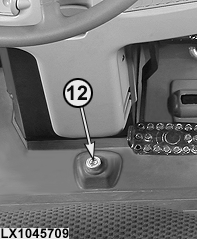
12 |
Differential lock |
ON/OFF |
|
13 |
Keys for selecting ranges with DirectDrive transmission |
Manually selecting the range for the preferred speed |
|
iTEC |
iTEC™ Menu Softkey |
Activating the iTEC™ home page |
|
OULXA64,0002694-19-20121115 |