iTEC - Status Page
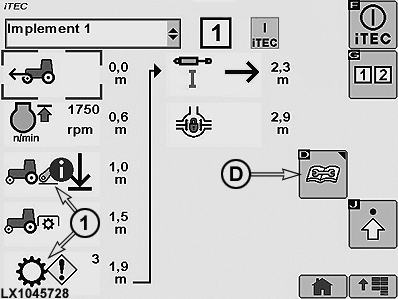
LX1045728-UN-18AUG10
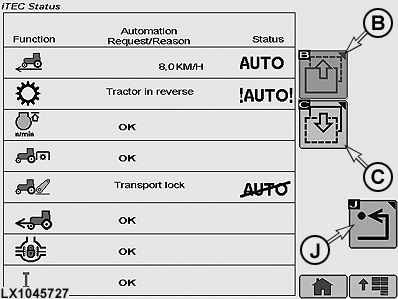
LX1045727-UN-17AUG10
iTEC - Status Page
1 - Alert
B - Previous Page Softkey
C - Next Page Softkey
D - Status Softkey
J - Return to Previous iTEC Page
The status page can be accessed from all available iTEC pages using softkey (D).The status page can also be activated if one or more alerts (1) appear. See also iTEC - Alerts in this Section.
Status of all available functions is displayed on the status page.
Use softkey (B) or (C) to navigate to the other pages if more functions are available than those shown on the current status page.
The iTEC status page has three columns:
|
Function |
Auto/Command/Cause of Fault |
Status |
|
All the available functions appear in the list. |
• OK appears if the function can be performed properly. • Current status appears if the operator changes the status of this function or if the function is currently being executed by the iTEC. • A brief text appears on the display if the function is not ready to perform requests (commands) from the iTEC. |
• Vacant field The function is being performed properly and OK appears in the second column. • AUTO The function is being performed properly. The work process is displayed in the second column. • !AUTO! The function currently has a fault. The cause is displayed in a brief text in the second column. • AUTO Automation is not available for iTEC or the operator is intervening in this function. The cause is displayed in a brief text in the second column. |
|
OULXA64,000269B-19-20101124 |