iTEC - Recording Mode, Set Up a Sequence While Driving
NOTE: iTEC learns a function when the condition of the function changes. Transmission functions are not learned if the reverser lever is in its position for reverse travel.
NOTE: A function can be changed several times during recording. If additional changes are carried out at less than two second intervals, they will be combined with the first into a single event.
-
LX1045725-UN-16AUG10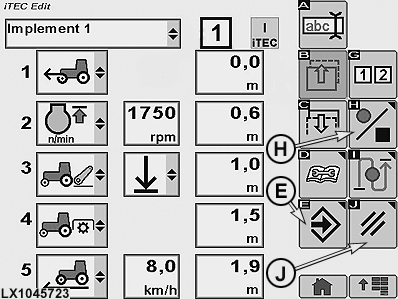
LX1045723-UN-28OCT10iTEC - Editing Page
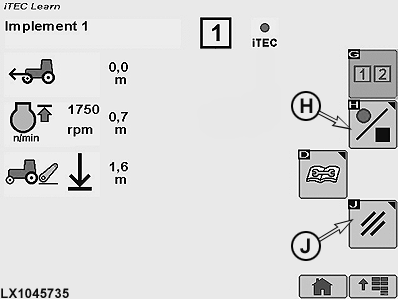
LX1045735-UN-28OCT10iTEC - Learning Page
E - Save/Enter Softkey
H - Softkey for Start/End Recording of Sequence
J - Cancel Softkey
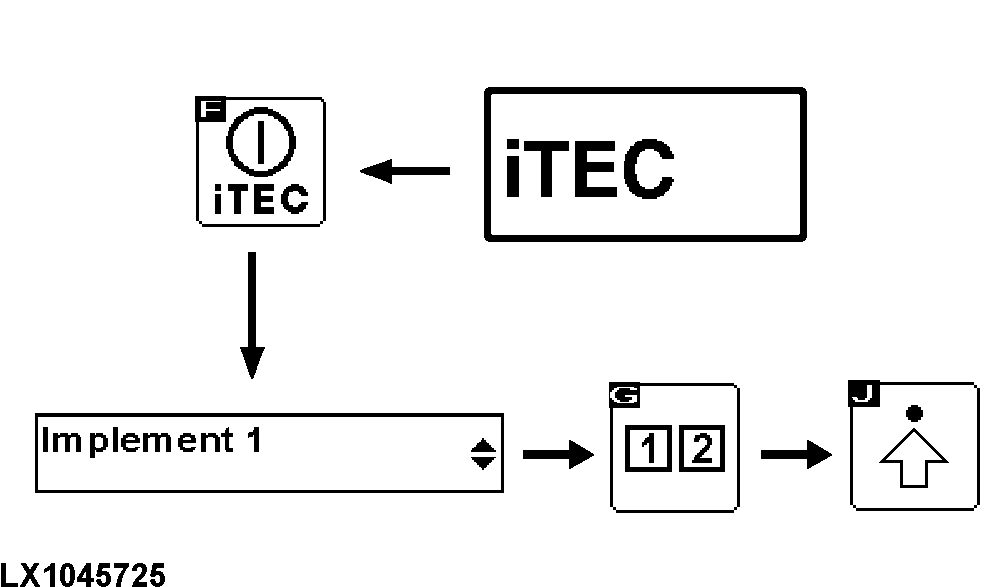
Select the iTEC home page and then press the iTEC ON/OFF softkey. For more information, see iTEC - Home Page, Enter Program Mode in this Section. -
Make sure that iTEC is switched on. At the same time, the iTEC indicator light lights up on the instrument panel.
-
Navigate to drop-down box (1, implement selection) and select desired implement.
-
Use the sequence softkey to select Sequence 1 or 2. When the sequence has been selected, the relevant display appears.
-
Select softkey for Advance Settings.
-
Select softkey (H) to start recording the functions.
NOTE: When recording is selected, the iTEC display on the page changes to a flashing red spot and there is a beep every 2.5 seconds. At the same time, the iTEC indicator light on the instrument panel flashes and the relevant sequence number lights up.
-
While driving, actuate the functions manually in the desired order and iTEC learns the sequence step by step.
NOTE: During recording, FieldCruise can be set by accessing the Engine Settings page (engine hotkey). Pressing the iTEC hotkey makes the iTEC Learn page re-appear.
It is also possible to perform functions with the tractor stationary, and to learn the distances later. See iTEC - Learn Distances in this Section.
-
After the functions have been carried out, they appear on the display together the relevant distances.
-
After all the desired functions have been carried out, select softkey (H) to end recording.
-
When recording has ended, the editing page re-appears. Select softkey (E) to save the changes or softkey (J) to delete all the changes.
|
OULXA64,000269E-19-20101124 |