iTEC - Learn Distances
NOTE: The Learn Distance function only allows distances to be learned for an existing sequence, or for existing distances to be relearned. To start the Learn Distance function, the sequence must include at least two functions.
NOTE: If the PTO is included in the sequence, iTEC can ONLY control the PTO if the PTO switch is in its ON position. For distance learning when entering a field, John Deere recommends that the lifting height of the hitch be limited so that the operator can switch on the PTO before learning begins.
-
LX1045725-UN-16AUG10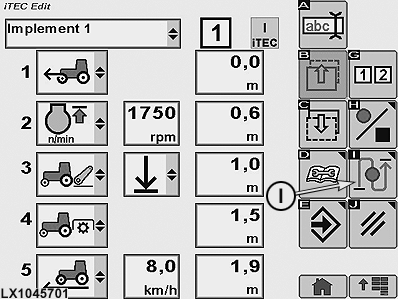
LX1045701-UN-16AUG10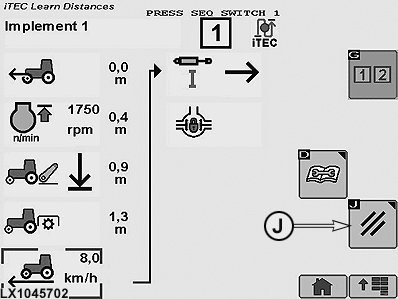
LX1045702-UN-16AUG10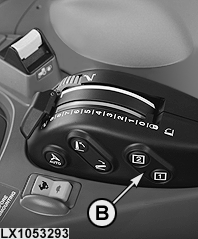
LX1053293-UN-19SEP11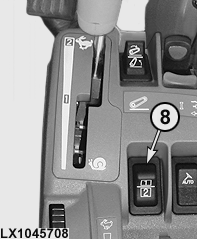
LX1045708-UN-22JUL108 - Sequence Switch
I - Softkey Start Learn Distances
J - Cancel Softkey
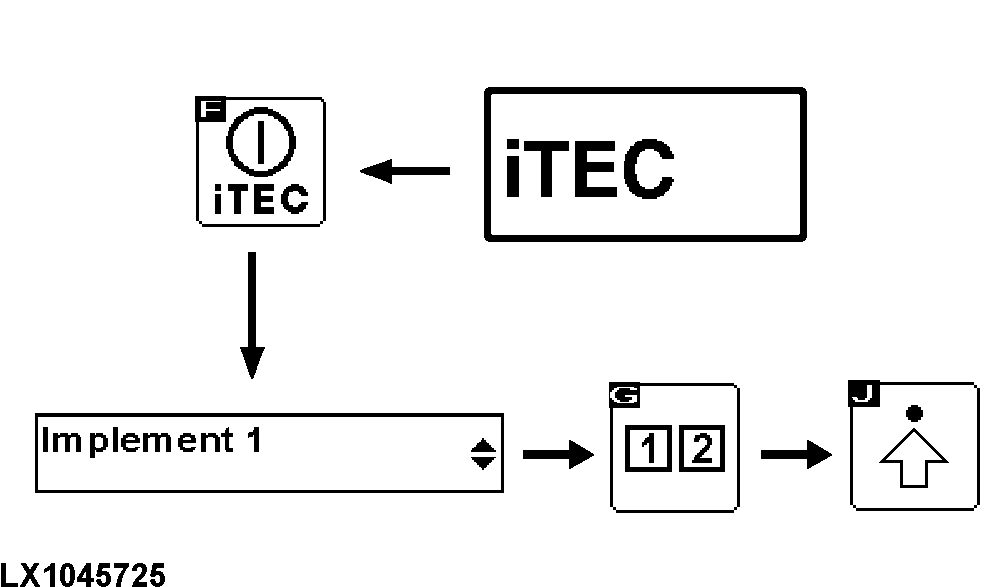
Select the iTEC home page and then press the iTEC ON/OFF softkey. For more information, see iTEC - Home Page, Enter Program Mode in this Section. -
Make sure that iTEC is switched on. At the same time, the iTEC indicator light lights up on the instrument panel.
-
Navigate to drop-down box (1, implement selection) and select desired implement.
-
Use the sequence softkey to select Sequence 1 or 2. When the sequence has been selected, the relevant display appears.
-
Select softkey for Advanced Settings.
-
If the sequence includes at least two functions, select softkey (I) to start Learn Distances.
IMPORTANT: For iTEC to operate, ground speed must be at least 0.5 km/h (0.31 mph).
-
At a ground speed of more than 0.5 km/h (0.31 mph), actuate sequence switch (8) as shown on the sequence display when each function is to be performed.
NOTE: Actuating the sequence switch causes the highlighted function to be carried out and the distance to be learned. Then the next function is highlighted.
-
The Learn Distance function ends automatically when all distances are learned. To cancel Learn Distance, select softkey (J).
|
OULXA64,00026A0-19-20110919 |