TIA - Activating the Implements
-
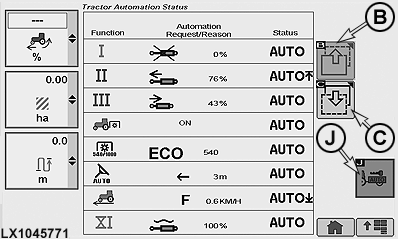
LX1045771-UN-16DEC10B - Previous Page Softkey
C - Next Page Softkey
J - Softkey for Activating Tractor-Implement Automation
Copy full tractor serial number and implement make, model, and serial number before requesting activation code from Stellar Support through dealer. -
Give your John Deere dealer the tractor serial number and equipment make, model, and serial number so that the dealer can request the activation code from Stellar Support.
-
When your dealer has given you the 24- to 26-digit activation code, go to the CommandCenter™ menu and access the TIA status page.
-
Select softkey (J) and access the page for activating the implements.
-
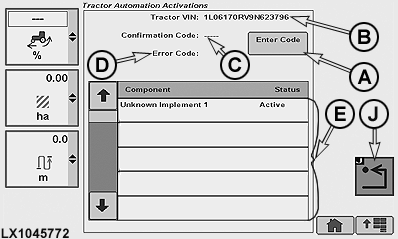
LX1045772-UN-16DEC10A - Enter Code Box
B - Tractor Vehicle Identification Number Location
C - Confirmation Code Location
D - Fault Code
E - Component List
J - Save/Enter Softkey
Number (B) must match the serial number of the tractor. -
To enter the activation code, select box (A).
NOTE: When activating Tractor-Implement Automation, some keyboard characters on keyboard are grayed out and are not used in activation codes. If received activation code includes any characters that are grayed out on Tractor-Implement Automation Activation page keyboard, request dealer reconfirm activation code.
-
Key in the activation code at the keyboard. See also Rename iTEC Implement/Sequence in Section 51.
-
Confirm the entry at softkey (J).
-
If Activation Code is entered correctly, Confirmation Code appears at center top of page (C), and Code Accepted is displayed.
NOTE: If any response codes not covered in table are received after entering an Activation Code, double check the code, retry entering it and if that does not work, contact the dealer.
-
If the activation code is wrong, an error code (D) appears. See also the table of frequently-encountered error codes and text descriptions.
Error Codes, Text Descriptions and Corrective Actions
Frequently-Encountered Error Codes
Text Displayed
Corrective Action
0
Code Accepted
None Required
4
Implement Not Available to Deactivate
Implement Already Deactivated
5
Implement Already Activated
None Required, implement should work as expected
6 and 11
Space Unavailable for Activation
Contact your dealer for assistance
17
Demonstration Activation Replaced With Permanent Activation
None Required
NOTE: Until an implement is connected to the tractor for the first time, Unknown Implement No. is displayed in component list (E) on the TIA page. See also Operating Tractor Implement Automation in this section.
|
CommandCenter is a trademark of Deere & Company |
OULXA64,00026B6-19-20120622 |