TIA - Requirements for AutoPowr
LX1037182-UN-06JUN06
LX1045781-UN-18JAN11
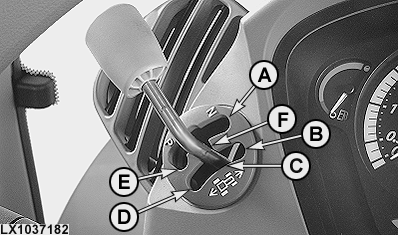
A - Neutral Position
B - Forward Position
C - Power Zero Position
D - Reverse Position
E - Corner Park Position
F - Center Park Position
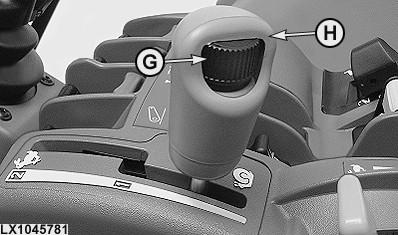
G - Speed Wheel
H - Speed Control Lever
Before transferring control to the implement, perform all necessary steps to prepare the implement as indicated in the operator's manual of the implement.While operating, implement has the ability to:
- Accelerate the tractor up to the speed limit set by the operator.
- Stop the tractor.
- Start to drive the tractor again, with the approval of the operator.
NOTE: The maximum speed for each speed range is adjusted by the operator using the speed wheel (G) and speed control lever (H), and is dependent directly on engine speed.
In accelerator pedal mode, maximum speed is also affected by the accelerator pedal.
To drive faster than the safe creeper speed of 0.5 – 2 km/h while in accelerator pedal mode, the operator must move the accelerator pedal to the desired position. For more information, see also AutoPowr™ — Accelerator Pedal Mode in Section 48, Operating the Tractor - AutoPowr™.
The implement cannot command a maximum speed higher than the preset maximum speed.
Approval to start driving the tractor again after stopping:
- Move the reverser lever from Forward Position (B) to Center Park Position (F), and then move the reverser lever back through Power Zero (C) to Forward Position (B).
- Actuate clutch pedal or brake pedal while the tractor rolls to a stop and hold the pedal while the tractor is stationary. Releasing the pedal causes the tractor to start moving.
NOTE: An example of when it would be necessary to cycle reverser lever through scroll position is after a round baler stops the tractor to eject a full bale.
The following preconditions have to be met before transferring implement control:
- Operator sitting on seat.
- No malfunctions present at the AutoPowr.
- Reverser lever must be in Center Park (F), Power Zero Position (C), or Forward Position (B).
Transfer control using AutoTrac™ resume switch or TIA resume softkey as presented in the implement Operator's Manual.
To withdraw control using the reverser lever:
- During driving: Move lever out of Forward Position (B).
- During stopping: Move lever to reverse position (D), neutral position (A) or corner park position (E).
To withdraw control using the speed control lever or the speed wheel:
- Increasing the speed if the implement commands stopping the tractor will end the travel speed Auto Mode.
- Increasing the speed can end the Auto Mode. The implement has all information to inform the operator that this intervention will end the travel speed Auto Mode (see implement Operator's Manual).
NOTE: Reducing the speed is always allowed.
It is allowed to increase the limit set by the operator within 2 seconds after starting the travel speed Auto Mode.
The current travel speed can be limited by other processes (e.g. iTEC). This limit will be observed, however, it will not be considered as an intervention by the operator.
|
AutoTrac is a trademark of Deere & Company |
OULXA64,00026BE-19-20120816 |