Hitch Control
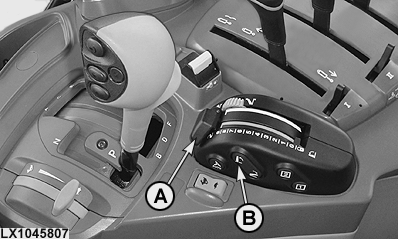
LX1045807-UN-24JAN11
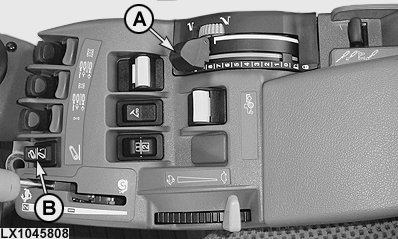
LX1045808-UN-24JAN11
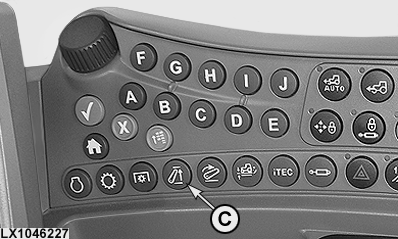
LX1046227-UN-22JUN11
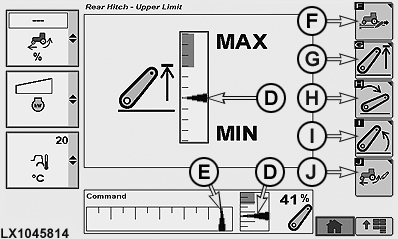
LX1045814-UN-26JAN11
Lift Limit Page
A - Hitch Control
B - Raise/Lower Switch
C - Lift-Limit Button
D - Schematic of Current Lift Height
E - Schematic of Current Position of Control (A)
F - Softkey, Load Control/Depth Control
G - Softkey, Height Limit
H - Softkey, Rate of Drop
I - Softkey, Rate of Lift
J - Softkey, Slip Sensitivity
The hitch is controlled by means of hitch control lever (A) and raise/lower switch (B). Button (C) is used to select the lift-limit page.
NOTE: On the lift-limit page, arrow (E) represents the position of hitch control (A), and arrows (D) represent current lift height.
Softkeys (F) to (J) are used to access the various pages of the hitch.
To prepare the hitch for operation, start the engine and either:
- move control (A) to the position that corresponds to the position of draft links,
- move control (A) to one of the end positions, or
- actuate raise/lower switch (B).
Pull control (A) towards 0 to raise implement
Push
control (A) towards 9 to lower implement
The implement can be raised and lowered independently of control (A) by means of raise/lower switch (B). This is of assistance when turning at the end of a field, for example. If the upper part of raise/lower switch (B) is pressed, the implement is raised as high as the raise-limit setting. If the lower part of switch (B) is pressed, the implement is lowered as far as the setting at control (A).
To obtain working depth quickly in compact soil at the headland (quick lower), keep raise/lower switch (B) pressed. As long as raise/lower switch (B) is pressed, the adjusted draft force is not active (override function). If switch (B) is released, the implement returns to the previous settings.
LX1037154-UN-28SEP05
Hitch Lock Activated
 CAUTION: Always engage the hitch lock before travelling with
the tractor!
CAUTION: Always engage the hitch lock before travelling with
the tractor!
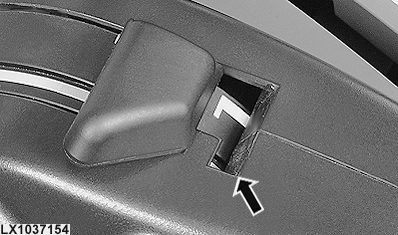
Pull control lever as far as it will go (beyond 0) - hitch is locked.
|
OULXA64,00026D2-19-20120319 |