AutoPowr™ — Settings
Set the travel speed
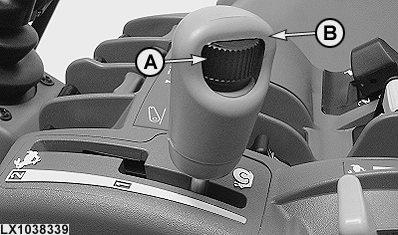
LX1038339-UN-18MAY06
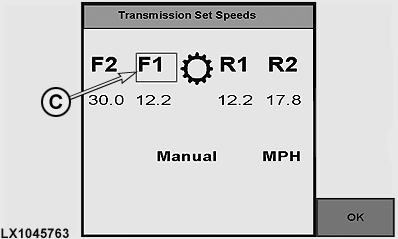
LX1045763-UN-20DEC10
A - Speed wheel (for setting maximum speed)
B - Speed Control Lever
C - Band Mark
The maximum speed in a speed band is adjusted using speed wheel (A) and speed control lever (B).
NOTE: The maximum speed setting is shown on the display instruments by means of the LEDs on the circumference of the speed display.
To set a forward speed band only, switch on the ignition and move the reverse drive lever to forward. Use speed control lever (B) to select the desired band and set the desired travel speed with wheel (A).
To set a reverse speed band only, switch on the ignition and move the reverse drive lever to reverse. Use speed control lever (B) to select the desired band and set the desired travel speed with wheel (A).
To set a forward and a reverse speed band, turn on the ignition and shift the reverse drive lever to neutral. Band mark (C) alternates every 2 seconds between the forward and reverse speed bands. Use speed control lever (B) to select the desired band and set the desired travel speed with wheel (A).
Set cruise control (FieldCruise™)
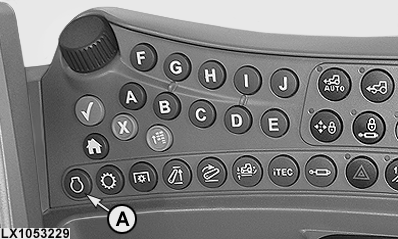
LX1053229-UN-27JUN11
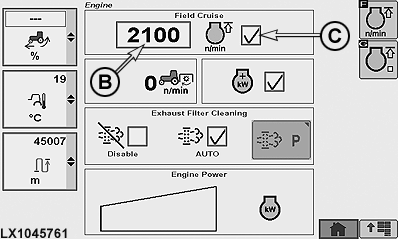
LX1045761-UN-10DEC10
A - Engine Button
B - Cruise Control
C - Cruise Control On/Off
With this option, an upper limit for engine speed can be set for performing certain work such as operating a hydraulic motor.
Run the engine, set the hand throttle to maximum speed, then press engine button (A) and set the desired engine speed in box (B), then activate cruise control at box (C).
In the lowest setting, engine speed is limited to 1050 rpm. When FieldCruise™ is switched on, the speed can be set to a value between 1050 rpm and rated speed. Maximum engine speed can only be obtained with FieldCruise™ switched off. Individual engine speed limits can be set between these two positions.
Set the operating modes
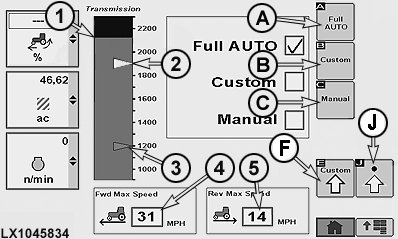
LX1045834-UN-01APR11
1 - Cruise Control at Full Throttle
2 - Auto Shift Engine Speed (White Marker)
3 - Fuel Economy Minimum Engine Speed (Blue Marker)
4 - Forward Speed Limit
5 - Reverse Speed Limit
A - AUTO
B - Custom settings
C - Manual
F - Page for Custom Settings
J - Page for Advanced Settings
The AutoPowr™ transmission offers three operating modes to get the most fuel efficiency and load control from your tractor: Pressing the transmission button allows the desired operating modes to be selected on the page shown.
A — Full Auto
The minimum
engine speed for best fuel economy when operating the tractor under
light load is automatically set.
The engine speed droop of
the auto shift is automatically set for use of full power when the
tractor is operated under full load.
B — Custom
Operator
can choose the Fuel Economy Minimum Engine Speed, Auto Shift Engine
Speed Droop, and Load Anticipation reaction.
C — Manual
Tractor
performs as though equipped with a normal transmission and reacts
to controls. No Fuel Economy or Load Control functions are active
in this mode.
|
A — Full Auto |
B — Custom |
C — Manual |
|---|---|---|
|
|
|
Bar graph in the left region reflects preset operating settings in Full Auto mode. Each of the following, after being preset, will remain unchanged during operation, and the operator will hear engine rpm rise or lower as tractor reacts to changing conditions and lever movements.
- The black area (1) shows engine speed limit (cruise control) at full throttle.
- White marker (2) reflects auto shift engine speed.
- Blue marker (3) reflects fuel economy engine speed.
Forward Maximum Speed or Reverse Maximum Speed displays the maximum forward (4) or reverse (5) speed limits. To change the Maximum Speed, select appropriate Maximum Speed box. When Maximum Speed box highlights, select desired speed. Increasing the speeds does not change the dynamic behavior of the tractor. But if the operator changes the Maximum Forward or Reverse speed below current set speed, the set speed would decrease to the max speed and the vehicle speed would decrease.
Custom settings
NOTE: All settings pertaining to this page are only applicable when AutoPowr™ transmission is in Custom mode.
RXA0110751-UN-20SEP10
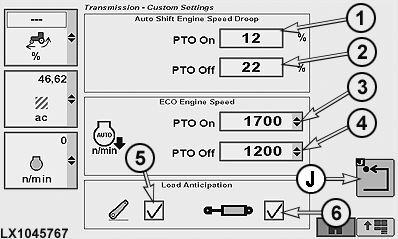
LX1045767-UN-01APR11
1 - Engine Speed Droop with PTO ON
2 - Engine Speed Droop with PTO OFF
3 - ECO Engine Speed with PTO switched on
4 - ECO Engine Speed with PTO switched off
5 - Load Anticipation (Hitch)
6 - Load Anticipation (SCV)
J - Previous Page Softkey
The Load Anticipation feature allows the AutoPowr™ transmission to predict loads due to activation of hitch or SCVs. By default, Load Anticipation is enabled in the Full Auto mode selected on the Transmission page. In custom mode, anticipated load from the hitch and/or PTOs is activated when the relevant check box is activated for hitch and/or SCVs.
Fuel economy feature may raise minimum engine speed to 1560 rpm when load anticipation is enabled and either the hitch/ SCV is placing a heavy load on the engine or an SCV is in continuous flow. If load on the engine is still too much, load anticipation feature may raise minimum engine speed to 1800 rpm.
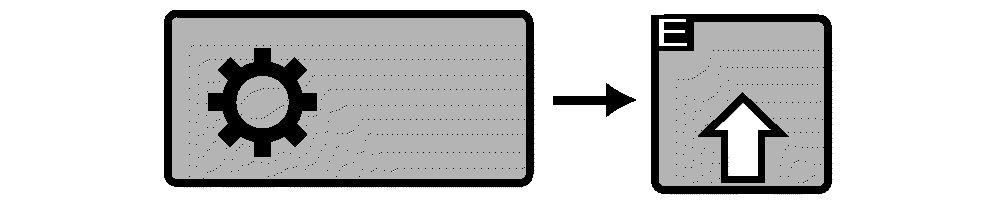
Press the transmission button and actuate custom settings softkey (E).
NOTE: Auto Shift Engine Speed Droop can be set from 4 % to 30 % with PTO ON or OFF.
1 — Set auto shift engine speed droop
under full load with PTO engaged:
Select drop-down
box (1) for PTO switched ON and specify the desired percentage.
2 — Set auto shift engine speed droop
under full load with PTO disengaged:
Select drop-down
box (2) for PTO switched OFF and specify the desired percentage.
3 — Set ECO Engine Speed under part
load, with PTO switched on:
Select drop-down box
(3) for ECO Engine Speed with PTO switched on and specify any desired
percentage.
4 — Engine speed (ECO) at partial load,
with deactivated PTO:
Select drop-down box (4)
for ECO Engine Speed with PTO switched off and specify any desired
percentage.
To turn on Load Anticipation:
Select either hitch check box (5) or SCV check box (6). When SCV check box is checked, engine speed is boosted, if needed, at each occurrence SCV is extended or retracted. When Hitch check box is checked, engine speed is boosted, if needed, at each occurrence hitch is lowered.
NOTE: If ECO OFF is set for ECO Engine Speed in drop-down boxes (3) and (4), the Anticipated Load functions for hitch and SCVs appear grayed out (dimmed) and cannot be activated.
Select softkey (J) to return to previous page.
Set the reverse-forward speed ratio
RXA0104032-UN-22JUL09
Transmission → Advanced settings
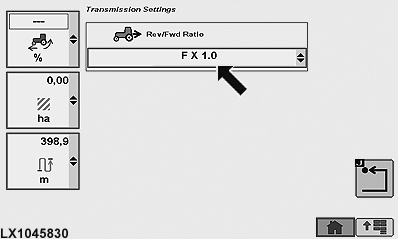
LX1045830-UN-31JAN11
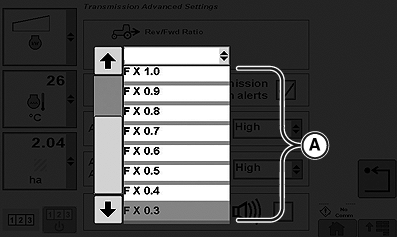
RXA0106031-UN-29JUL10
Drop-down box for set speed ratio
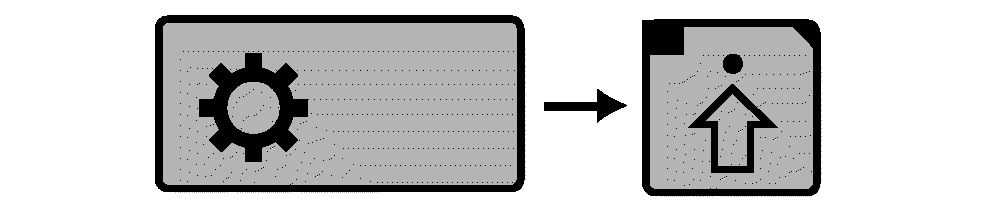
Press the transmission button and select the Advanced Settings button on the transmission page. Select any desired speed ratio (A) from drop-down box. There are 2 variants:
-
In speed band 1, reverse speeds can be set to a maximum of 30%
higher (selection 1.3) and 70% lower (selection 0.3) than forward
speeds. A setting such as this only takes effect if the maximum speed
in a speed band is adjusted using the speed wheel.
In speed band 2, the forward/reverse speed ratio is 1:1 up to 22 km/h (14 mph). Above that speed, it changes automatically to 40:30 or 50:30.
- If independent is selected, any speed can be set in speed band 1 and 2 for each direction of travel. This does not apply to creeper mode.
Adjusting AutoClutch Sensitivity
RXA0104032-UN-22JUL09
Transmission → Advanced settings
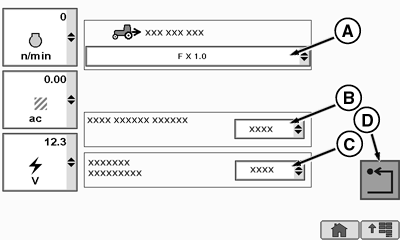
RXA0112567-UN-22DEC10
Page for advanced transmission settings
A - Drop-Down Box for Forward/Reverse Speed Ratio
B - AutoClutch Sensitivity Drop-Down Box
C - Acceleration Aggressiveness Drop-Down Box
D - Back softkey
AutoClutch is a function whereby the vehicle clutch automatically separates when the main brake is applied.
Changing the sensitivity setting of the AutoClutch alters the way in which the clutch separates automatically. This changes the time-lag between initiation of braking and the point in time when the clutch separates. If set correctly, this has a positive effect on braking characteristics when driving with a trailer.
The lower the sensitivity, the greater the actuation of the trailer brake so that the hitched-up unit remains stretched. This also implies that more force is required to actuate the foot brake.
To adjust AutoClutch sensitivity, press the transmission button and select the Advanced Settings button on the transmission page. Select desired AutoClutch sensitivity (B) in the drop-down box. There are three different settings:
- High (factory default): is primarily for driving without a trailer or with a trailer on level ground.
- Medium: is primarily for driving with a trailer in moderately hilly terrain.
- Low: is recommended for driving downhill with a trailer, particularly if ground conditions are difficult.
NOTE: When Medium and Low settings are selected, more force is required to depress the brake pedal.
To return to previous page, select Return softkey (D).
Adjusting Acceleration Aggressiveness
RXA0104032-UN-22JUL09
Transmission → Advanced settings
RXA0112567-UN-22DEC10
Page for advanced transmission settings
A - Drop-Down Box for Forward/Reverse Speed Ratio
B - AutoClutch Sensitivity Drop-Down Box
C - Acceleration Aggressiveness Drop-Down Box
D - Back softkey
Changing the acceleration aggressiveness setting can improve the way a tractor and trailer pick up speed when starting from a stationary position. The heavier the trailer, the lower the acceleration aggressiveness setting of the tractor. This prevents a hitched-up unit from swaying back and forward, which is particularly important when fluids are being transported.
To adjust acceleration aggressiveness, press the transmission button and select the Advanced Settings button on the transmission page. Select desired acceleration aggressiveness (C) in the drop-down box. There are three different settings:
- High (factory default): is for light trailers.
- Medium: is for medium trailers.
- Low: is for heavy trailers.
To return to previous page, select Back softkey (D).
|
1 (See AutoPowr™ — Operating on Hillsides
in Slippery Conditions in this section.)
|
OULXA64,00026F3-19-20130731 |