Engaging the PTO
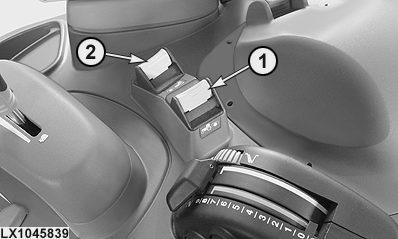
LX1045839-UN-04FEB11
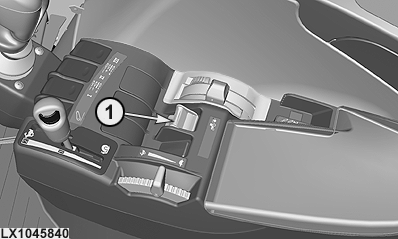
LX1045840-UN-04FEB11
With CommandARM™
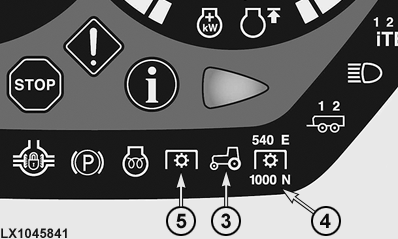
LX1045841-UN-04FEB11
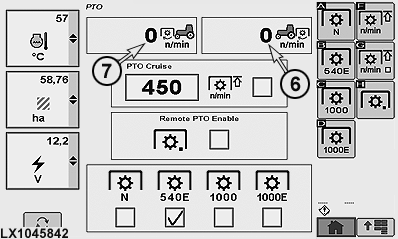
LX1045842-UN-04FEB11
1 - Rear PTO Switch
2 - Front PTO Switch
3 - PTO Indicator Light
4 - Rear PTO Indicator Light
5 - Front PTO indicator light
6 - Rear PTO speed
7 - Front PTO speed
 CAUTION: Always disengage the PTO when not in use.
CAUTION: High-inertia implements do not come to a standstill
the moment a PTO is shifted to the disengaged position. Do NOT approach
the implement while it is coasting down. Do not work on the implement
until it has stopped.
NOTE: On tractors with PowrQuad Plus or AutoQuad Plus transmission, the electronic engine-speed matching should be turned off during PTO operation. See Settings for the relevant transmission in the Operating the Tractor section.
To operate the PTO, push the switches (1) and (2) down and then forward. The PTO starts up, and the warning lights (3) and (4), or (3) and (5) go on.
The current speeds of PTOs (6) or (7) are displayed on the PTO page in the CommandCenter.
NOTE: The PTO speed limit can only be activated for the rear PTO. See the information on the following pages.
To switch off the PTOs, pull switch (1) or (2) back. The indicator lights go out and 0 is displayed in the PTO speed windows when the PTO stub shaft has stopped rotating.
NOTE: If the engine is shut off and then restarted while the PTO is running, the PTO will not operate.
In the case of the rear PTO, indicator lights (3) and (4) remain on.
In the case of the front PTO, indicator light (5) goes out but indicator light (3) remains on.
To continue working, switch off the PTO and switch it on again.
On tractors with AutoPowr, an alarm sounds if the operator leaves the seat while the PTO is still running.
|
CommandARM is a trademark of Deere & Company |
OULXA64,0002712-19-20130731 |