CommandCenter™ - Menu
LX1045878-UN-16FEB11
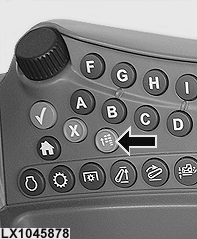
Menu Button
RXA0098156-UN-07NOV08
Menu Button
LX1045874-UN-16FEB11
Press the menu button.
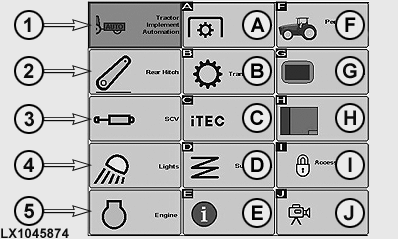
NOTE: Depending on tractor configuration, the number and order of displayed icons may vary.
In the menu, the operator can access the relevant page for any tractor function.
- 1 — Tractor-Implement Automation (TIA): Integrate implements in TIA. (See Section 52).
- 2 — Hitch: Adjust hitch. (See Section 50).
- 3 — SCV: Adjust the selective control valves. (See Section 60).
- 4 — Lights: Adjust lighting. (See Section 20).
- 5 — Engine: Adjust FieldCruise™ or engine rpm. (See Section 40).
- A — PTO: Adjust PTO speed. (See Section 70).
-
B — Transmission: Change settings
at transmission:
— PowrQuad PLUS transmission (See Section 46.)
— AutoQuad PLUS transmission (See Section 47.)
— IVT/AutoPowr transmission (See Section 48.) - C — iTEC: Adjust iTEC functions. (See Section 45).
- D — Suspension: Adjust suspension (cab and TLS front axle). (See Section 45).
- E — Message Center: Manage Message Center. (See Section 16).
- F — Performance Monitor: Adjust functions. (See Section 16).
- G — Display: Adjust display functions. (See Section 16).
- H — Layout Manager: Adjust Layout Manager functions. (See Section 16).
- I — Access Manager: Adjust Access Manager functions. (See Section 16).
- J — Video: (See Section 16).
The following tractor functions can also be displayed in the menu, provided they are installed on the tractor.
- Original GreenStar: Adjust Original GreenStar components. (See appropriate Operator's Manual for Original GreenStar Applications.)
- GreenStar: Adjust GreenStar components. (See appropriate Operator's Manual for GreenStar Applications.)
|
John Deere is a trademark of Deere & Company |
OULXA64,0002734-19-20120622 |