CommandCenter™ - Hotkeys
LX1053235-UN-29JUN11
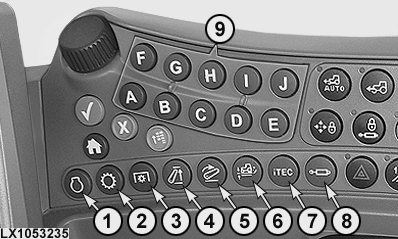
Pressing hotkeys (1) to (8) gives direct access to the appropriate page in CommandCenter™. Current settings appear on the page and changes can be made.
- 1 — Engine Page
- 2 — Transmission Page
- 3 — PTO Page
- 4 — Hitch Page, Upper Limit
- 5 — Hitch Page, Rate-of-Drop
- 6 — Hitch Page, Load/Depth Control
- 7 — iTEC™ Page
- 8 — SCV Page
- 9 — Hotkeys for Activating the Relevant Softkey on the Page
|
OULXA64,0002735-19-20110629 |