CommandCenter™ - Page Structure
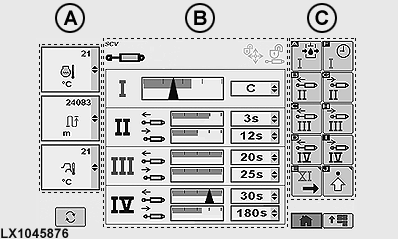
LX1045876-UN-16FEB11
Example of Page Structure
NOTE: Displayed page shown is reference only. Actual pages may appear differently due to connection of implements and tractor configuration.
CommandCenter™ pages are divided into three regions which each serve a different purpose.
A — Monitor boxes, in the left region of the page.
The three monitor boxes (A) constantly monitor the tractor functions. Monitor boxes can be selected independently and are displayed on all pages. Each box displays an ongoing function or specific tractor status.
NOTE: GreenStar functions can also appear on the page and be monitored.
B — Input Field, in the central region of the page.
Depending on tractor function, input field (B) has various boxes for making inputs and selections. These boxes allow the operator to view and change tractor settings in a wide variety of applications.
C — Softkey Options, in the right region of the page.
Softkey options are available to the operator from current page. Select a softkey to display a new page or function, or to change a setting or selection.
NOTE: Various boxes are active on most of the pages.
|
OULXA64,0002736-19-20110224 |