CommandCenter™ - Set Up Monitor Boxes
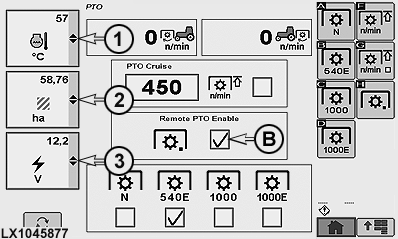
To select the various monitor functions, select relevant drop-down box (1), (2) or (3) and desired monitor or display function. See list below to learn what each monitor box stands for:
LX1045877-UN-17FEB11
RXA0107361-UN-14MAY10
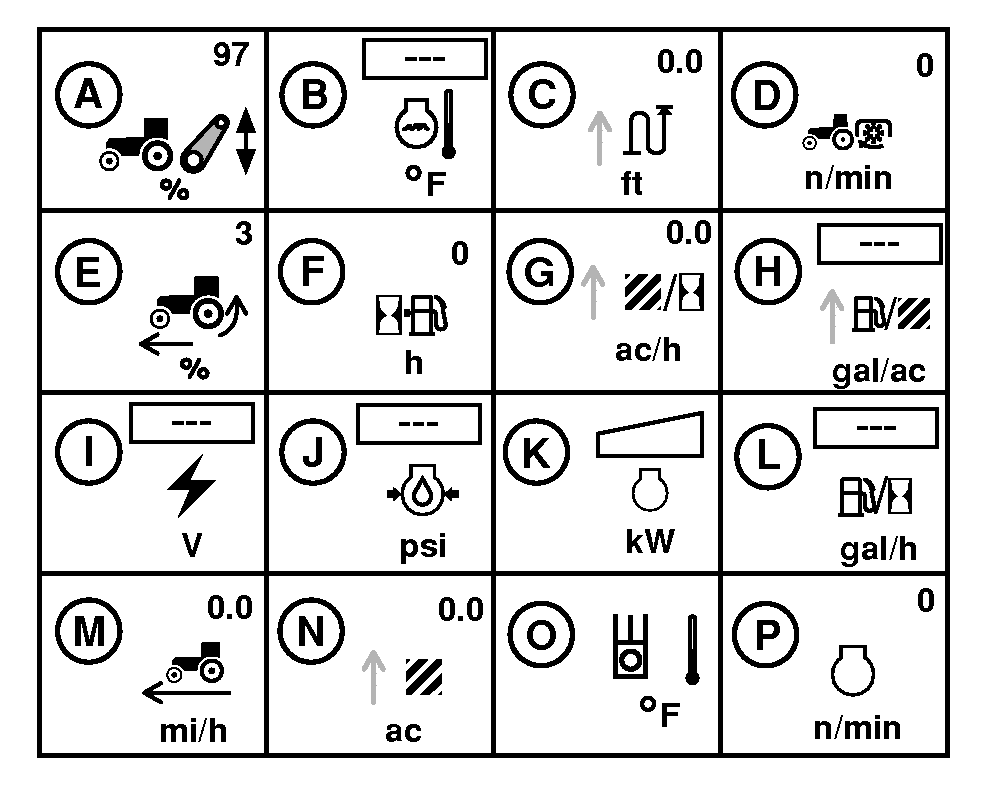
List of Monitor Boxes in Left Region of CommandCenter™
A — Rear Hitch Position - Displays current rear hitch position.
B — Engine Coolant Temp - Engine coolant Temperature in °C or °F.
C — Distance Counter - Accumulated distance the tractor has traveled displayed in meters or feet.
D — Rear PTO Speed - Displays rear PTO speed in rpm.
E — % Slip - (Requires Radar) Displays current wheel slippage as a percent of ground speed compared to the true ground speed.
F — Fuel Remaining - Estimated time until fuel tank is empty.
G — Area Per Hour - Area covered per hour. A number based on current implement width and speed traveled over time.
H — Fuel Consumption Per Area - The amount of fuel used is accumulated over time based on the last area counter reset.
I — System Volts - Supply system voltage.
J — Engine Oil Pressure - Engine oil pressure in kPa or psi.
Set engine Speed in maximum rpm.
K — Engine Power - Engine power using a bar graph display.
L — Fuel Consumption Per Hour - Displays Liters (or U.S. Gallons) consumed per hour.
M — Wheel (Ground) Speed - Calibrated ground speed as measured at the axle.
N — Total Area Covered - Total area covered displayed in hectares or acres.
O — Hydraulic Temperature - Hydraulic oil temperature.
P — Engine RPM - Engine speed in revolutions per minute.
|
OULXA64,0002737-19-20110218 |