CommandCenter™ - Softkeys
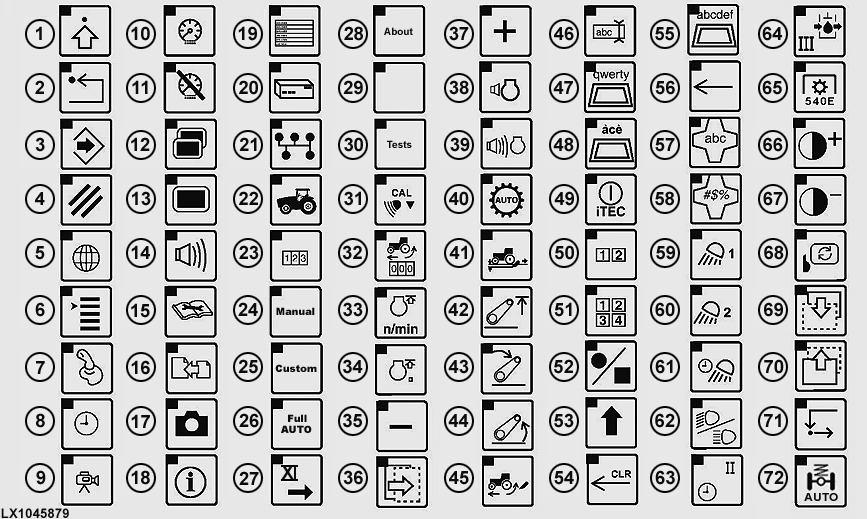
LX1045879-UN-22MAR11
1 - Advanced Setting1
2 - Back1
3 - Save/Enter1
4 - Cancel1
5 - Regional Settings—Display
6 - Highlight Color in CommandCenter™
7 - Auxiliary Control, Display
8 - Date/Time
9 - Video
10 - Adjust Brightness, Display
11 - Dim Mode, Display
12 - Multiple Display
13 - Main Display
14 - Adjust Volume, Display
15 - Diagnosis
16 - Reprogramming—Message Center
17 - Transfer Debug Files—Message Center
18 - Information—Message Center
19 - Diagnostic Addresses—Message Center
20 - Electronic Control Unit—Message Center
21 - Bus Information—Message Center
22 - Performance Monitor Main Page
23 - Performance Monitor Totals, Settings
24 - Manual—AutoPowr/IVT™ Transmission
25 - Customized—AutoPowr/IVT™ Transmission
26 - Auto—AutoPowr/IVT™ Transmission
27 - Additional SCVs
28 - About—Display
29 - Readings—Display
30 - Tests—Display
31 - Calibrate Radar
32 - Wheel Slip
33 - FieldCruise™ Settings
34 - FieldCruise™ On/Off
35 - Decrease Value
36 - Next Page
37 - Increase Value
38 - Volume Compensation—Radio
39 - Volume—Radio
40 - Automatic Transmission Control
41 - Load/Depth Control—Hitch2
42 - Upper Limit—Hitch
43 - Drop Rate—Hitch2
44 - Raise—Hitch2
45 - Slip Sensitivity—Hitch2
46 - Text Input
47 - Keyboard Layout, Standard
48 - Keyboard Layout, Special Symbols
49 - iTEC™ ON/OFF—iTEC™3
50 - Sequence Select—iTEC™3
51 - Sequence Select—iTEC™ (Field Installed Kit)3
52 - Start/Stop Record Sequence—iTEC™3
53 - Upper/Lower Case Toggle
54 - Clear Editing Box
55 - Keyboard Layout, Alphabetical
56 - Back Space
57 - Alphabetical Mode
58 - Digits/Mathematical Mode
59 - Field Position 1—Lights4
60 - Field Position 2—Lights4
61 - Egress Lighting—Lights4
62 - High/Low Beam—Lights4
63 - Detent Time—SCV5
64 - Flow Rate—SCV5
65 - Rear PTO, Standard Speed6
66 - Increase Contrast—Video
67 - Decrease Contrast—Video
68 - Mirror—Video3
69 - Next Page3
70 - Previous Page3
71 - TIA — Tractor-Implement Automation7
72 - TLS Front Axle8
NOTE: This list of softkeys is not exhaustive; it can vary with implement and tractor configuration. Softkeys are dealt with in the relevant text passages.
|
1 Softkey found throughout CommandCenter™
pages and function is constant throughout.
|
OULXA64,0002738-19-20110705 |