CommandCenter™ - Setting Distance Counter
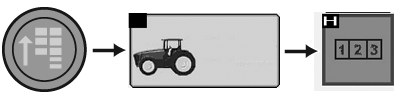
RXA0110779-UN-09SEP10
Menu Button → Performance Monitor → Performance Monitor Totals
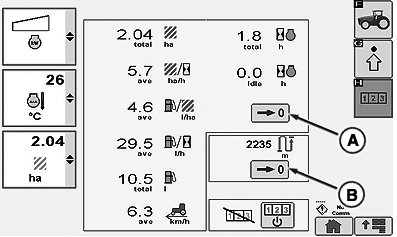
RXA0110778-UN-09SEP10
Performance Monitor Totals Page
A - Zero Area And Fuel Counter Button
B - Zero Distance Counter Button
-
Press the menu button.
-
Select Performance Monitor.
-
Select Performance Monitor Totals softkey.
-
To reset area counters or fuel counter, select Zero Area and Fuel Counter button (A).
-
To reset distance counter, select Zero distance counter button (B).
|
OULXA64,0002745-19-20120625 |