CommandCenter™ - Setting Performance Monitor Access

RXA0110765-UN-09SEP10
Menu → Access Manager Icon
LX1053243-UN-07JUL11
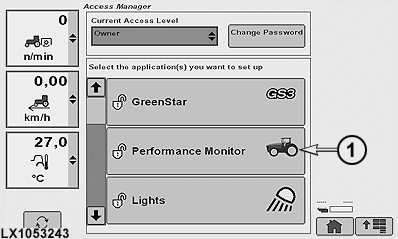
Access Manager Applications
LX1053244-UN-07JUL11
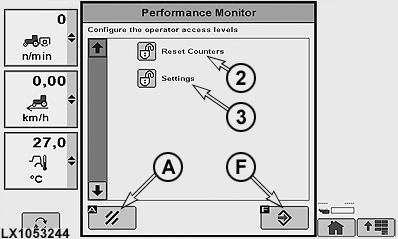
Set the Access Level for the Operator
1 - Performance Monitor Icon
2 - Reset Counters
3 - Settings
A - Cancel Softkey
F - Enter/Save Softkey
-
Press the menu button.
-
Select Access Manager.
-
Select Performance Monitor (1).
-
Select Reset Counters (2) for Distance, Area and Fuel Counters.
Select Settings (3) for Service Interval and Implement Width.
-
Select Enter/Save softkey (F) to save changes.
Select Cancel softkey (A) to exit without saving changes.
|
OULXA64,0002746-19-20120625 |