CommandCenter™ - Setting Alarm Volume
-
RXA0098156-UN-07NOV08Menu Button
RXA0099747-UN-14JUL10Display
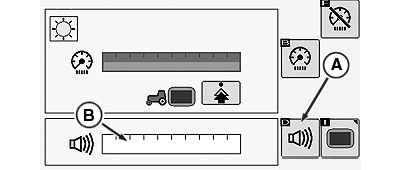
RXA0106070-UN-02AUG10Display Main Page
A - Adjust Volume Softkey
B - Adjust Volume Bar Graph
Press the menu button. -
Select a display.
-
Select Adjust Volume softkey (A) to highlight Adjust Volume bar graph (B), then make adjustment.
|
OULXA64,0002749-19-20120625 |