CommandCenter™ - Calibrating John Deere Dual-Beam Radar
RXA0098156-UN-07NOV08
Menu Button
RXA0110753-UN-20SEP10
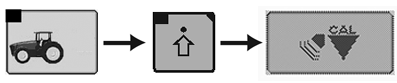
Performance Monitor → Performance Monitor Settings → Calibrate Radar
RXA0106591-UN-02AUG10
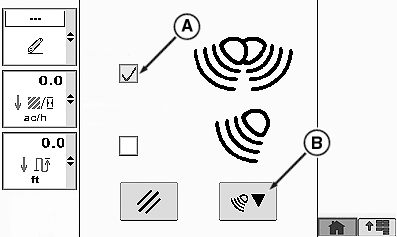
Calibrate Radar Page
A - Check Box, Dual-Beam John Deere™ Radar Activated
B - Calibration Box
IMPORTANT: Other-make (non-John Deere) radars must always be integrated into the CommandCenter™ manually. See CommandCenter™ - Calibrate Other-Make Radars Manually in this Section.
NOTE: Use automatic calibration for JOHN DEERE dual-beam radar only.
-
Press the menu button.
-
Select Performance Monitor.
-
Select Performance Monitor Settings softkey.
-
At the bottom of the page, select the Calibrate Radar button.
-
Place check (tick) in John Deere Dual-Beam Radar check box (A).
-
Select calibration box (B) and follow instructions in CommandCenter™.
-
Calibration results will display on CommandCenter™.
-
If failed message is received, perform procedure again.
NOTE: If calibration fails at three successive attempts, contact your John Deere dealer.
NOTE: After the John Deere dual-beam radar has been calibrated successfully, recommended practice is to match wheel speed to radar sensor speed. See CommandCenter™ - Match Travel Speed to Radar Sensor Speed in this Section.
|
FieldCruise is a trademark of Deere & Company. |
OULXA64,000275A-19-20120625 |