CommandCenter™ - Calibrate Other-Make Radars Manually
RXA0098156-UN-07NOV08
Menu Button
RXA0110753-UN-20SEP10
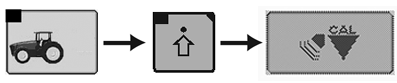
Performance Monitor → Performance Monitor Settings → Calibrate Radar
RXA0106592-UN-02AUG10
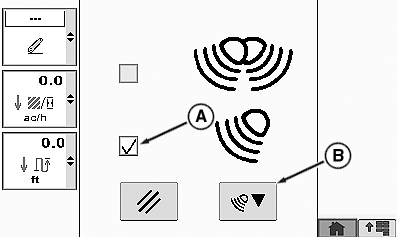
Calibration Box
A - Check Box, Other-Make Radar Activated
B - Calibration Box
NOTE: Manual calibration must not be performed on dual-beam John Deere™ radar.
Use automatic calibration for JOHN DEERE dual-beam radar only. See CommandCenter™ - Calibrating John Deere Dual-Beam Radar in this Section.
Manual calibration of the radar involves calculating the pulses of the radar sensors in relation to travel speed. Comparison between travel speed and radar sensor speed is performed automatically. For more information, see CommandCenter™ - Match Travel Speed to Radar Sensor Speed in this Section.
Preliminary work:
Tractor with no load (unladen)
On a hard level dry surface, mark out a 400 ft. (122 m.) course. Place easily visible markers at the start and end of the course.
Calibration:
-
Drive unladen tractor up to course start line, but do not cross it.
-
Press the menu button.
-
Select Performance Monitor.
-
Select Performance Monitor Settings softkey.
-
At the bottom of the page, select the Calibrate Radar button.
-
Place check (tick) in Other-Make Radar check box (A).
-
Select calibration box (B) and follow instructions in CommandCenter™.
-
Calibration results will display on CommandCenter™.
-
If failed message is received, perform procedure again.
NOTE: If calibration fails at three successive attempts, contact your John Deere dealer.
|
John Deere is a trademark of Deere & Company |
OULXA64,000275B-19-20120625 |