CommandCenter™ - Match Travel Speed to Radar Sensor Speed
RXA0098156-UN-07NOV08
Menu Button
LX1045885-UN-24FEB11
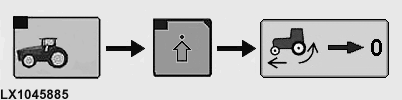
Performance Monitor → Performance Monitor Settings → Calibrate Slippage
Changing the size of the tires can result in deviations with regard to the speed actually travelled. Matching involves recalculating the tire rolling characteristics, which is required to calculate travel speed.
Tractors with a radar sensor can make a comparison between displayed travel speed and travel speed that is actually measured.
Preliminary work:
On a hard, level, dry surface in the open, drive the unladen tractor.
Calibration:
-
Press the menu button.
-
Select Performance Monitor.
-
Select Performance Monitor Settings softkey.
-
At bottom left of page, actuate the Calibrate Wheel Slip box.
-
Follow the instructions on the CommandCenter™.
-
The result of calibration is displayed on the CommandCenter™.
|
OULXA64,000275C-19-20120625 |