Automatic Exhaust Filter Cleaning
LX1049795-UN-20AUG10
LX1049796-UN-02DEC10
LX1049798-UN-20AUG10
LX1049779-UN-22JUL10
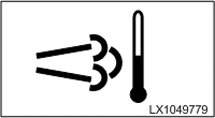
Indicator Light for Exhaust Filter Cleaning
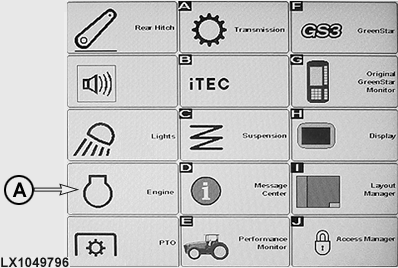
A - Button, Accessing the Engine Menu
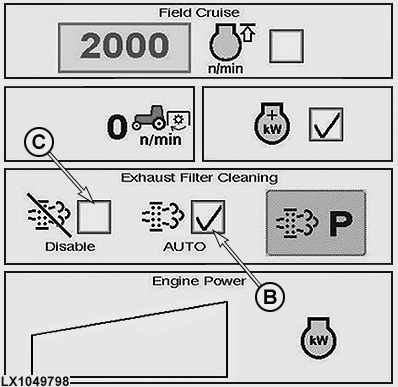
B - Choice Box, Activating Automatic Exhaust Filter Cleaning
C - Choice Box, Deactivating Automatic Exhaust Filter Cleaning
Automatic exhaust filter cleaning is started when soot in the exhaust filter reaches a certain level. This occurs less frequently if the engine is operated for long periods under conditions where passive exhaust filter cleaning takes place. Automatic exhaust filter cleaning is initiated and performed without any intervention on the part of the operator. Automatic exhaust filter cleaning is performed only if the relevant function is activated in the CommandCenter™.NOTE: An automatic exhaust filter cleaning must be canceled, if you wish to start an exhaust filter cleaning with tractor parked
Activating the automatic exhaust filter cleaning function (recommended setting):
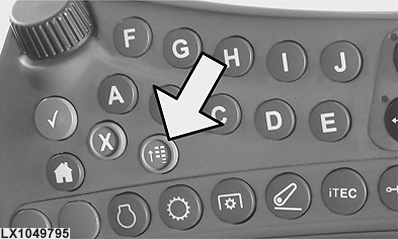
Press menu button (see arrow). Then press button (A) and access the engine menu. Activate choice box (B) for automatic exhaust filter cleaning with a check (tick). An indicator light comes on to show that the exhaust filter is currently being cleaned (see illustration at the bottom).
NOTE: Depending on the conditions under which the tractor is operating, engine control may raise the slow idle speed. In some cases, CommandCenter™ displays a message instructing the operator to change operational conditions. Comply with these instructions if the situation allows.
Deactivate the automatic exhaust filter cleaning function:
Press menu button (see arrow). Then press button (A) to access the engine menu. To deactivate the automatic exhaust filter cleaning function, put a check (tick) in choice box (C).
Do not deactivate automatic exhaust filter cleaning unless it is absolutely necessary.
IMPORTANT: See also Clean Exhaust Filter Safely in Section 05.
NOTE: See also Access the Engine Menu in CommandCenter™.
|
OULXBER,0001945-19-20120625 |