Displaying and Deleting Diagnostic Trouble Codes with CommandCenter™
Diagnostic trouble codes are displayed here.

LX1051629-UN-22FEB11
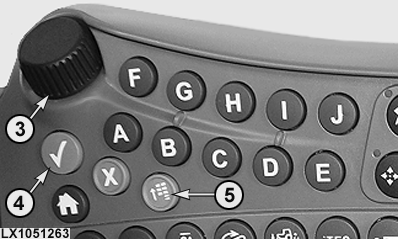
LX1051263-UN-22FEB11
1 - CommandCenter™
2 - Button Panel
3 - Thumb Wheel (Highlighting and Setting Values)
4 - Enter Button (Confirming, Hiding, Saving and Starting)
5 - Menu Button
Access to the CommandCenter™ is achieved by means of the buttons and thumb wheel on the button panel.
-
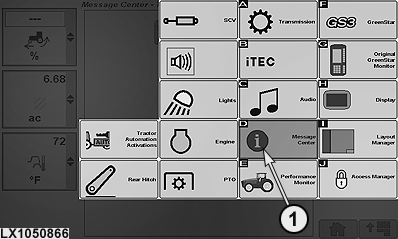
LX1050866-UN-12OCT11Menu
1 - Softkey for Message Center Page
NOTE: If any diagnostic trouble codes or informative messages are displayed on the CommandCenter™, keep pressing the enter button until all the diagnostic trouble codes and messages are hidden.
Press the menu button.
NOTE: Order of displayed icons can vary depending on vehicle configuration.
Use the thumb wheel to highlight the softkey for message center page, then press the enter button.
-
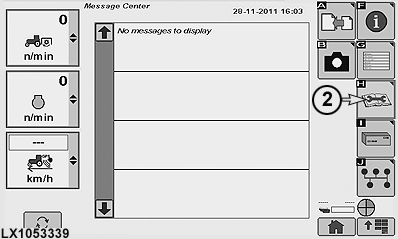
LX1053339-UN-29NOV11H - Softkey for Diagnostic Trouble Codes
Use the thumb wheel to highlight the softkey for diagnostic trouble codes, then press the enter button. -
Use the thumb wheel to highlight the softkey for Show All Codes, then press the enter button to show all the diagnostic trouble codes on the tractor. Alternatively, highlight the desired control software in the list, then press the enter button to show the diagnostic trouble codes associated with the relevant control software.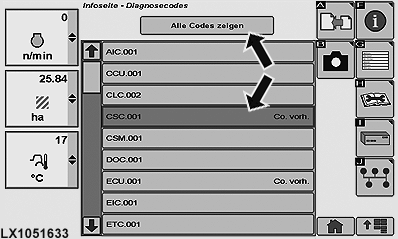
LX1051633-UN-23FEB11The list can be moved up and down using the thumb wheel.
NOTE: Control software list can vary depending on installed options.
-
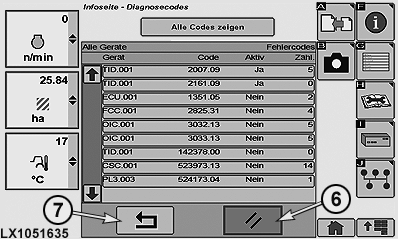
LX1051635-UN-26JUL116 - Delete Softkey
7 - Back Softkey
Use the thumb wheel to highlight the delete softkey, then press the enter button to delete all the diagnostic trouble codes.NOTE: Do not delete any diagnostic trouble code unless the cause of the relevant fault has been eliminated.
To cancel or exit, use the thumb wheel to highlight the back softkey, then press the enter button.
|
CommandCenter is a trademark of Deere & Company |
OULXBER,0001AA9-19-20120625 |