Front Loader with Return-to-Position Function
Description
The return-to-position function is an automatic function for the front loader. It permits two positions to be set to which the boom and bucket return automatically. Once the two positions have been set, simply pushing the multi-function lever briefly in the desired direction is enough to make the boom or bucket move automatically to its preset position.
It is also possible to store an angle of tilt for the bucket as zero position if such an angle is required repeatedly. This position then appears on the CommandCenter™ as "0°". Any change in bucket position is displayed in degrees (e.g. +110° or -98°) relative to the stored 0° position. To bring the bucket back to its zero position, the multi-function lever must be actuated until “0°” once again appears on the CommandCenter™. The return-to-position function is active only at speeds below a maximum of 16 km/h.
IMPORTANT: If the front loader is replaced with a front loader with the return-to-position function, then functional errors can be expected. To ensure the fault-free function, an adjustment or calibration of the components becomes necessary after attaching a different front loader. See your John Deere dealer for this.
Access the return-to-position window
-
Press button (1) repeatedly until the return-to-position window opens.
-
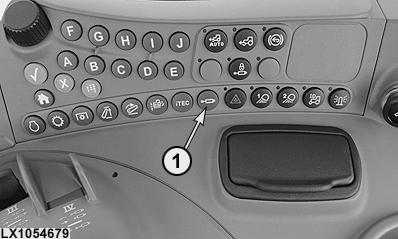
LX1054679-UN-12APR12
Alternatively, press the selective control valve softkey in the CommandCenter™ menu.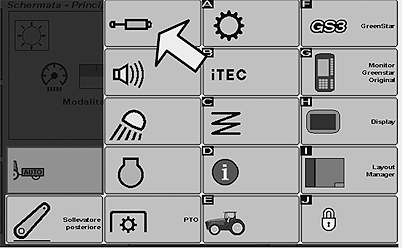
LX1054678-UN-12APR12 -
Then in the window shown, press the softkey with the front loader icon.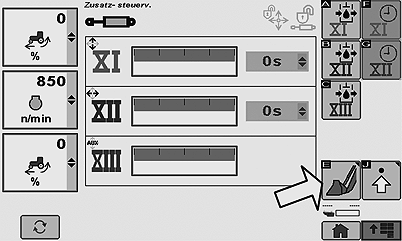
LX1054680-UN-12APR12
Return-to-position window
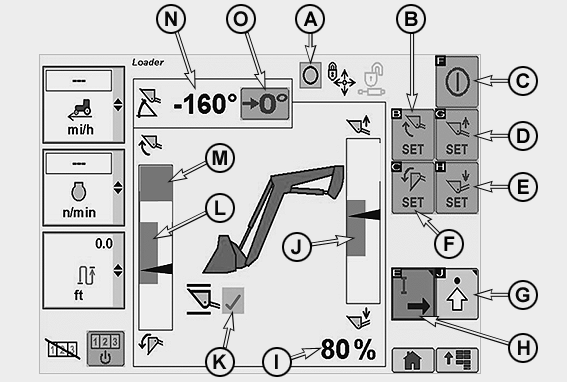
LX1054667-UN-16APR12
Return-to-position window
|
A |
Status display - Return-to-position on = I; off = 0 |
|
B |
Set top bucket position |
|
C |
Return-to-position; activate = I or de-activate = 0 |
|
D |
Set top boom position |
|
E |
Set bottom boom position |
|
F |
Set bottom bucket position |
|
G |
Change to SCV settings (see Selective Control Valves) |
|
H |
Change to speed settings of E-ICVs (see Selective Control Valves) |
|
I |
Boom position display in percent, with 100% = highest position |
|
J |
Bar diagram representing movement between top and bottom return-to-positions |
|
K |
Electronic self-levelling; activate = Tick (check) or de-activate = No tick (check) |
|
L |
Bar diagram representing tilt between top and bottom return-to-positions |
|
M |
Area in which front loaders without mechanical self-levelling cannot be used. This prevents the contents of the bucket being accidentally dumped on the cab roof. |
|
N |
Display showing angle of tilt of bucket in relation to a previously set zero point |
|
O |
Softkey "0" is for marking any desired zero point within the bucket's range of movement. This permits a frequently required bucket position to be found again. Movement towards this point must be made manually. |
|
- |
The arrows in the gray bars indicate the current positions of the bucket and boom. Every time an automatic movement takes place, the color of the arrows changes from black to green. |
NOTE: Check the status of the electronic self-levelling function (K) every time the tractor is restarted.
If a front loader without mechanical self-levelling is installed, then electronic self-levelling is always active.
If a front loader with mechanical self-levelling is installed, the previous electronic self-levelling setting always remains active.
Set the return-to-position function
LX1054668-UN-12APR12
-
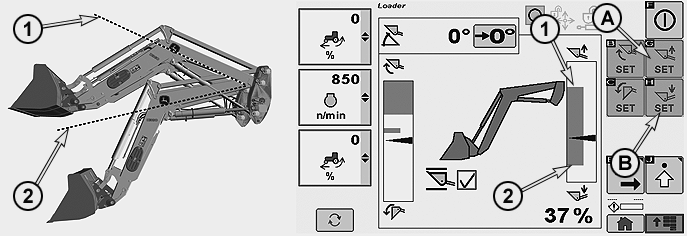
Move the boom to the desired top position (1) and then press button (A).
-
Move the boom to the desired bottom position (2) and then press button (B).
NOTE: The top return-to-position must always be higher than the bottom return-to-position. To activate float position, the boom must first be raised to a height of ≤ 30% (watch the display).
LX1054669-UN-12APR12
-
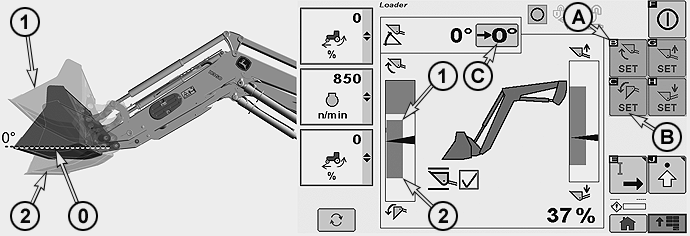
Move the bucket to the desired top position (1) and then press button (A).
-
Move the bucket to the desired bottom position (2) and then press button (B).
-
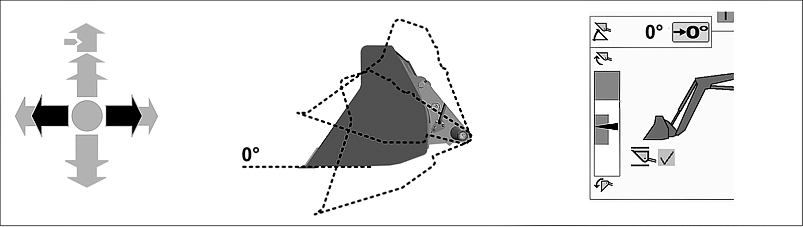
Move the bucket to any desired angle, then press button (C) to store the position. The angle-of-tilt display now reads 0°. This permits a frequently required bucket position to be found again. The angle display provides the operator with information on the current position of the bucket relative to the zero point. Movement towards this point must be made manually.
NOTE: The top return-to-position must always be higher than the bottom return-to-position. The zero point may be at any desired position.
Multi-function lever functions
LX1054684-UN-08MAY12
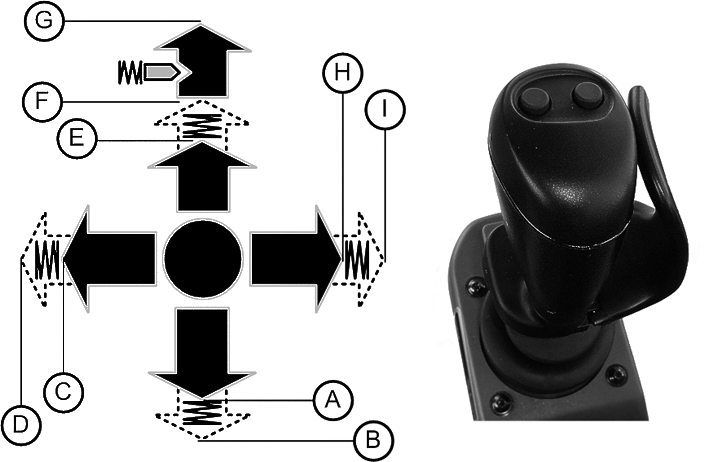
IMPORTANT: The return-to-position function can be stopped by moving the multi-function lever briefly in the opposite direction. Example: Stop the boom while it is moving downward = Move the multi-function lever to the rear (A).
|
A |
Pull the multi-function lever back until the boom is raised to the desired height. Do not move the lever beyond the point of resistance. |
|
B |
Pull the multi-function lever back until it is beyond the point of perceptible resistance, then release it. This initiates the return-to-position function for the top position. The boom stops automatically at the preset top position. |
|
C |
Move the multi-function lever to the left until the bucket reaches the desired top position. Do not move the lever beyond the point of resistance. |
|
D |
Move the multi-function lever to the left until it is beyond the point of perceptible resistance, then release it. This initiates the return-to-position function for the top position. The bucket stops automatically at the preset position. |
|
E |
Push the multi-function lever forward until the boom is lowered to the desired height. Do not move the lever beyond the point of resistance. |
|
F |
Push the multi-function lever forward until it is beyond the point of perceptible resistance, then release it. This initiates the return-to-position function for the bottom position. The boom stops automatically at the preset bottom position. |
|
G |
Push the multi-function lever all the way forward and engage in detent to activate the float position. The lever remains in the detent until it is pulled back by hand. |
|
H |
Move the multi-function lever to the right until the bucket reaches the desired bottom position. Do not move the lever beyond the point of resistance. |
|
I |
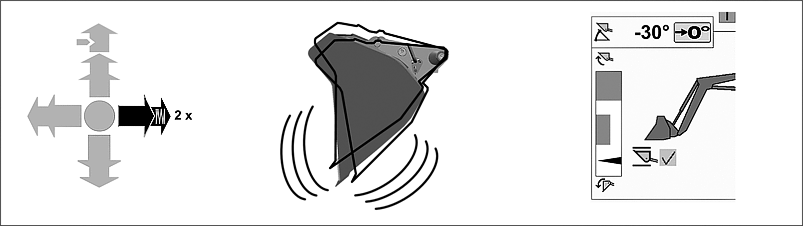
Move the multi-function lever to the right until it is beyond the point of perceptible resistance, then release it. This initiates the return-to-position function for the bottom position. The bucket stops automatically at the preset position. Move the multi-function lever to the right twice in brief succession beyond the point of resistance and hold it there. This activates the bucket shake function. |
Operating the boom
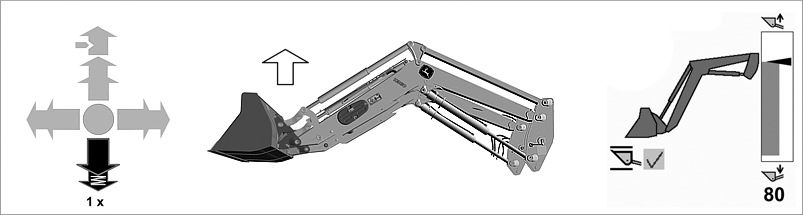
LX1054670-UN-19APR12
Return-to-position, top position - Pull lever back once briefly beyond the point of resistance, and release.
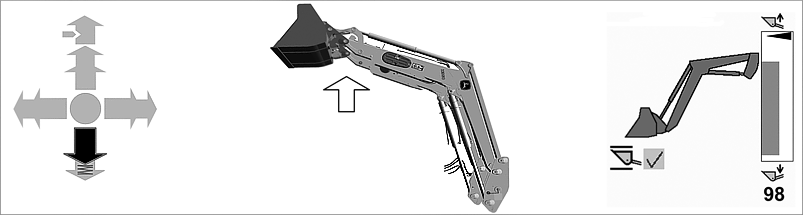
LX1054672-UN-19APR12
Raise boom above top return-to-position - Pull lever back without passing the point of resistance.
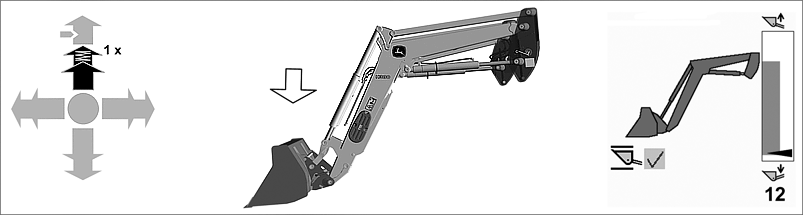
LX1054671-UN-19APR12
Return-to-position, bottom position - Push lever forward once briefly beyond the point of resistance, and release.
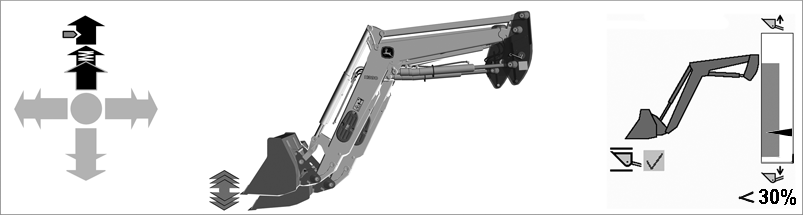
LX1054673-UN-09MAY12
Float position - Engage lever in forward detent.
NOTE: To activate float position, the boom must first be raised to a height of ≤ 30% (watch the display).
Operating the bucket
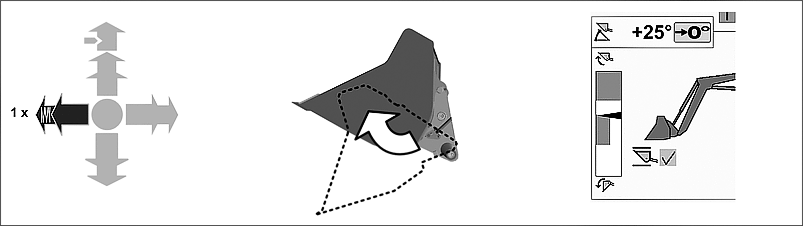
LX1054674-UN-19APR12
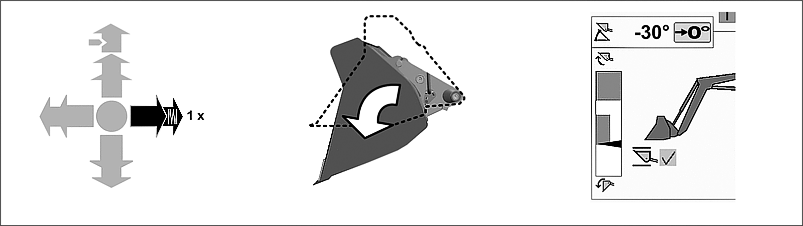
Return-to-position, top position - Move lever to the left once briefly beyond the point of resistance, and release.
LX1054675-UN-19APR12
Return-to-position, bottom position - Move lever to the right once briefly beyond the point of resistance, and release.
LX1054676-UN-19APR12
Additional “shake” function - Move the lever to the right twice in brief succession beyond the point of resistance and hold it there.
LX1054677-UN-19APR12
Move bucket to zero position - Move the lever to right or left (without passing the point of resistance), until 0° appears on the display.
NOTE: The bucket must always be moved manually until 0° appears on the display.
Adjust the response
-
Press button (1) twice.
LX1054679-UN-12APR12 -
Press softkey (A).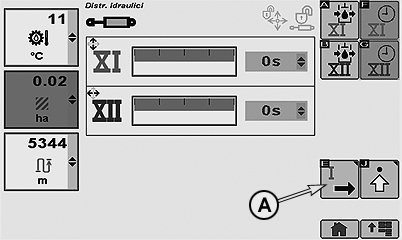
LX1054681-UN-12APR12 -
The characteristics of the multi-function lever can be set in field (B). This affects how the front loader responds if a return-to-position function is equipped.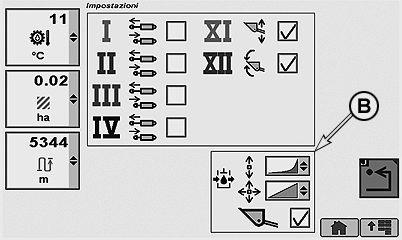
LX1054682-UN-12APR12Open the desired selection window and select a setting.
See illustration, from top to bottom: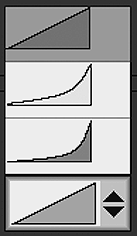
LX1054683-UN-12APR12- Orange, linear = Speed remains constant until final position is reached (abrupt stop).
- Yellow, combined = Speed drops off just before final position is reached.
- Green, progressive = Speed drops off gradually as final position is reached (very gentle stop).
IMPORTANT: Other settings can be made. They are described in this Section under “Additional Functions for Electronic Selective Control Valves”.
|
OULXBER,0001C6C-19-20120725 |