DirectDrive — Settings
Set travel speed
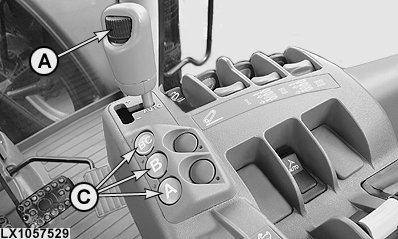
LX1057529-UN-05JUL12
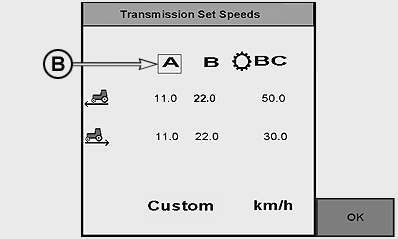
LX1057530-UN-27JUL12
A - Speed Wheel
B - Range Selection Marker
C - Range Selection Buttons
The maximum speed is adjusted using speed wheel (A).
NOTE: The maximum speed setting is shown on the instrument panel by means of the LEDs on the circumference of the speed display.
Set the maximum speed by moving the reverse drive lever out of the park position. Use buttons (C) to select the desired range and set the desired travel speed using speed wheel (A).
NOTE: In range BC, the maximum travel speed possible in reverse is 30 km/h (18.64 mph).
NOTE: When the PTO is switched on, priority is given to PTO speed. To increase or reduce travel speed, the tractor's transmission shifts automatically.
Set cruise control (FieldCruise™)
LX1053229-UN-27JUN11
LX1045761-UN-10DEC10
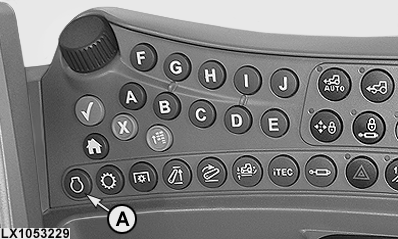
A - Engine Button
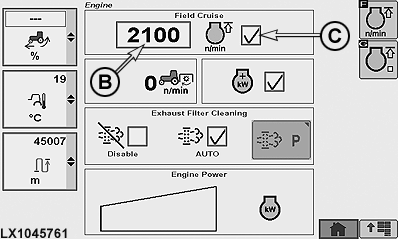
B - Engine Speed Limit
C - Cruise Control On/Off
With this option, an upper limit for engine speed can be set for performing certain work such as operating a hydraulic motor.
Run the engine, set the hand throttle to maximum speed, then press engine button (A) and set the desired engine speed in box (B). Then activate cruise control at box (C).
In the lowest setting, engine speed is limited to 1050 rpm. When FieldCruise™ is switched on, the speed can be set to a value between 1050 rpm and rated speed. Maximum engine speed can only be obtained with FieldCruise™ switched off. Individual engine speed limits can be set between these two positions.
Set operating modes
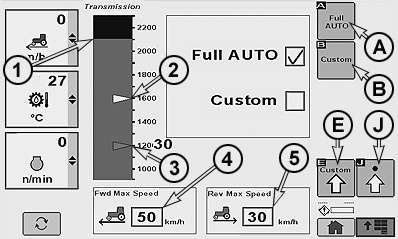
LX1057531-UN-27JUL12
1 - Cruise Control at Full Throttle
2 - Engine Speed Droop Setting (White Marker)
3 - ECO Engine Speed Minimum Setting (Blue Marker)
4 - Forward Speed Limit
5 - Reverse Speed Limit
A - Full Auto
B - Custom
E - Custom Settings Page
J - Advanced Settings Page
The DirectDrive transmission offers two operating modes to get the most fuel efficiency and load control from your tractor. Press the transmission button to go to the transmission menu.
A — Full Auto
In this
mode, ECO Engine Speed setting (3) is selected automatically under
light load.
Engine Speed Droop is automatically set for use
of full engine torque when the tractor is operated under full load.
B — Custom
The operator
can choose Cruise Control (ECO mode), Engine Speed Droop and Load
Anticipation.
|
A — Full Auto |
B — Custom |
|---|---|
|
|
|
*Applies only when PTO is switched off. ECO is not active when the PTO is switched on, as priority is given to reaching PTO speed. |
|
In Full Auto mode, the bar graph in the left region reflects preset operating settings:
- The black area (1) shows engine speed limit (cruise control) at full throttle.
- White marker (2) reflects Engine Speed Droop setting.
- Blue marker (3) reflects ECO Engine Speed minimum setting.
NOTE: These settings can be altered in Custom mode.
Reverse and forward maximum speeds are shown in box (4) and (5). To change the maximum speed, select appropriate maximum speed box and set the desired speed. Increasing the speeds does not change the dynamic behavior of the tractor. The maximum speed set in boxes (4) and (5) always takes utmost priority, even if a higher speed has been selected in another setting.
Custom settings
NOTE: All settings pertaining to this page are only applicable when DirectDrive transmission is in custom mode.
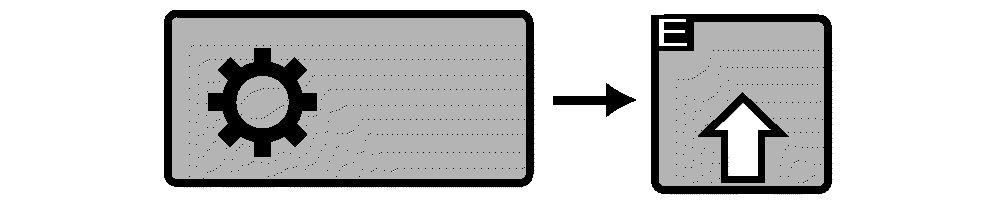
RXA0110751-UN-20SEP10
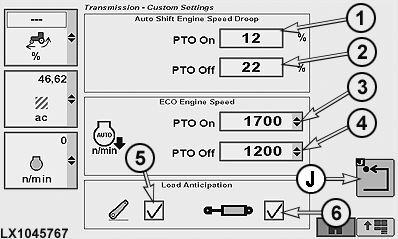
LX1045767-UN-01APR11
1 - Engine Speed Droop with PTO ON
2 - Engine Speed Droop with PTO OFF
3 - ECO Engine Speed with PTO switched on
4 - ECO Engine Speed with PTO switched off
5 - Load Anticipation (Hitch)
6 - Load Anticipation (SCV)
J - Previous Page Softkey
Engine Speed Droop: If engine speed is reduced under load, an adjustable automatic control ensures that e.g. a lower gear is selected to keep engine speed at a constant level when operating a PTO. Engine Speed Droop intensity depends on the setting which corresponds to a percentage of the current speed. Example: If Engine Speed Droop is set to 10 % at a preset engine speed of approx. 1930 rpm, transmission will shift down one gear if speed drops to approx. 1740 rpm. This would correspond to a drop in PTO speed from 540 to approx. 490 rpm accordingly. The Engine Speed Droop value can be set in PTO On drop-down box (1) or PTO Off drop-down box (2).
Engine Speed Droop also influences the shifting behavior when upshifting in Auto mode. The higher the value set for engine speed droop is, the sooner the tractor will shift up.
NOTE: Engine Speed Droop percentage with PTO On can be set from 6 % to 40 % or PTO OFF can be set from 20 % to 40 %.
ECO Engine Speed: This function allows fuel economy to be improved. If the speed commanded by the accelerator pedal or hand throttle has been reached, the engine speed that is required to maintain travel speed will be reduced automatically. Drop-down boxes (3) and (4) are used to select an engine speed which will not be reduced any further by the ECO Engine Speed function. Furthermore, ECO Engine Speed can be deactivated completely by selecting ECO Off.
NOTE: The value can be set in increments from 1200 rpm to 1800 rpm for PTO On and Off.
Load Anticipation: This setting is used to select an additional anticipated load created by the use of hitch (5) or SCV (6). If the hitch or the SCVs are actuated when ECO mode is active, engine speed will be increased momentarily.
Select softkey (J) to return to previous page.
Set the reverse/forward speed ratio
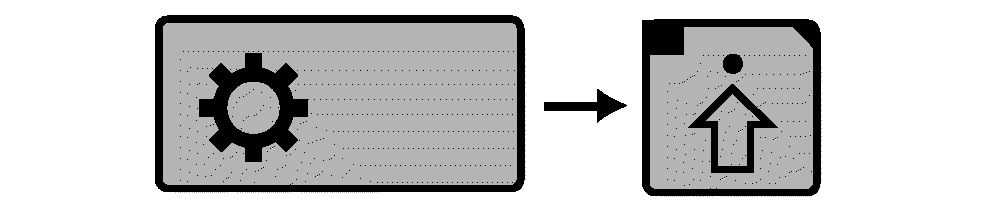
RXA0104032-UN-22JUL09
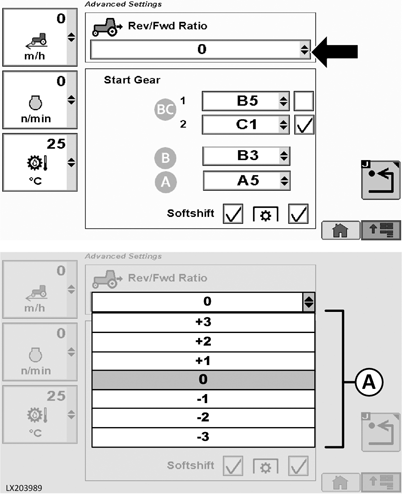
Transmission → Advanced Settings
LX203989-UN-16APR14
This function allows a different travel speed to be selected automatically when direction of travel is changed. This will be achieved by shifting gears. The ratio between forward and reverse speed can be set between +3 and -3. If direction of travel is changed, transmission will shift up or down one or more gears accordingly.
Press the transmission button and select the Advanced Settings button on the transmission page. Select the desired ratio from the drop-down box (A).
AutoClutch settings
AutoClutch is an automatic clutch function. When AutoClutch is switched on, the clutch pedal does not need to be pressed to stop the tractor.
If both brake pedals are depressed when driving the tractor, the speed will be reduced or the tractor stops. When the brakes are released again, the tractor automatically accelerates up to the speed currently commanded by the accelerator pedal or hand throttle.
 CAUTION: When AutoClutch is switched off, the clutch pedal must
be pressed to stop the tractor.
CAUTION: When AutoClutch is switched off, the clutch pedal must
be pressed to stop the tractor.
IMPORTANT: The AutoClutch function operates only when the brake pedals are coupled together. Actuating a pedal individually (e.g. to steer) does NOT actuate the automatic clutch function.
NOTE: The engine speed must not be below 900 rpm when using the brake pedals for steering (only one brake pedal depressed).
RXA0104032-UN-22JUL09
Transmission → Advanced Settings
LX203988-UN-16APR14
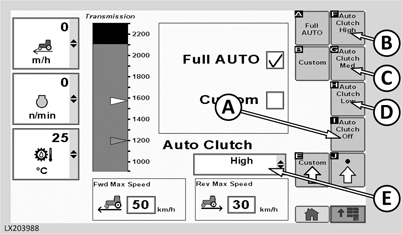
A - Select/Deselect AutoClutch
B - High Sensitivity
C - Medium Sensitivity
D - Low Sensitivity
E - Sensitivity Setting Drop-Down Box
Switch AutoClutch on and set sensitivity:
- Press the transmission button and select the Advanced Settings button on the transmission page.
- Press button (A) to switch AutoClutch on or off.
-
Press one of the buttons (B), (C) or (D) to set the sensitivity.
NOTE: If desired, the AutoClutch sensitivity setting can be
assigned to softkeys on the CommandCenter™ home page.
- The sensitivity can also be set using drop-down box (E). The drop-down box always displays the sensitivity currently selected.
IMPORTANT: AutoClutch remains switched on after start-up. If AutoClutch is switched off by the operator, it switches on again automatically the next time the tractor is started.
|
Meaning of buttons (A) to (E) |
|
|
(A) |
Switch the AutoClutch function on and off by pressing button (A). It can be switched off only if the brake pedals are NOT pressed. "Off" is displayed in the drop-down box after switching off. |
|
(B) |
High: is primarily for driving without a trailer or with a trailer on level ground. |
|
(C) |
Medium: is primarily for driving with a trailer in moderately hilly terrain. |
|
(D) |
Low: is recommended for driving downhill with a trailer, particularly if ground conditions are difficult. |
|
(E) |
As an alternative to buttons (B), (C) and (D), the sensitivity can also be set using a drop-down box. |
Set the start-up gear
RXA0104032-UN-22JUL09
Transmission → Advanced Settings
LX203987-UN-16APR14
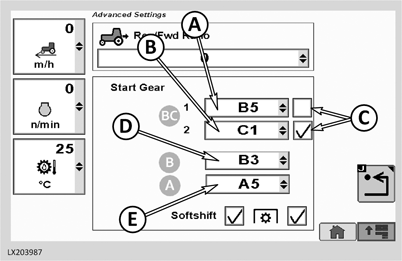
A - Select Start-Up Gear for Range BC “1”
B - Select Start-Up Gear for Range BC “2”
C - Check Box for Activation of Start-Up Gear “1” or “2”
D - Select Start-Up Gear for Range B
E - Select Start-Up Gear for Range A
For range BC, two start-up gears can be saved. When pulling away in range BC, the transmission automatically engages the gear that is marked at check box (C). One start-up gear can be saved for each of ranges A and B. When pulling away in range A or B, the transmission automatically engages the gear indicated at (D) or (E).
Selecting and saving the start-up gears:
- Press the transmission button and select the Advanced Settings button on the transmission page.
- Open drop-down box (A) and select start-up gear BC 1. Open drop-down box (B) and select start-up gear BC 2. In each drop-down box, any gear from B1 to C4 can be selected as start-up gear.
-
Two check boxes (C) are located on the right side of the drop-down
boxes. The selected start-up gear is marked by a check.
NOTE: On the CommandCenter™ home page, a corresponding
softkey can be assigned to enable the operator to toggle quickly between
the two start-up gears.
- One start-up gear can be selected for each of ranges A and B. Open drop-down box (D) or (E) and select the desired gear.
SoftShift when changing gears
RXA0104032-UN-22JUL09
Transmission → Advanced Settings
LX1057535-UN-27JUL12
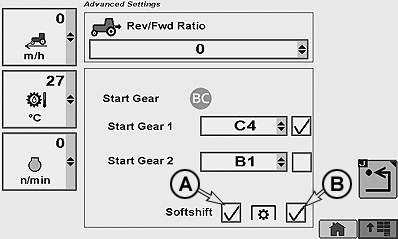
Press the transmission button and select the Advanced Settings button on the transmission page. Select SoftShift (A) and - if desired - PTO operation (B). Engine speed can then be matched in the following ways:
- Always off, if (A) is not activated
- On but off for PTO operation if only (A) is activated
- Always on, if (A) and (B) are activated
|
SS31170,0000376-19-20140422 |