DirectDrive — Stopping and Parking the Tractor
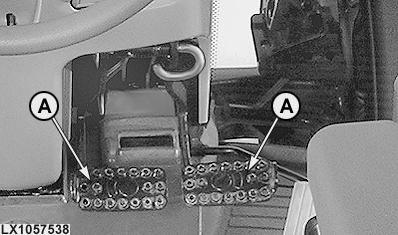
LX1057538-UN-10JUL12

LX1056751-UN-17SEP12

LX1057561-UN-12JUL12
A - Brake Pedals
B - Reverse Drive Lever
C - Park Lock Indicator Light
 CAUTION: Avoid injury due to losing control of tractor. Couple
brake pedals (A) together when driving on roads.
CAUTION: Avoid injury due to losing control of tractor. Couple
brake pedals (A) together when driving on roads.
-
Reduce throttle to low engine rpm.
-
-
If AutoClutch* is switched off, press both brake pedals and the clutch pedal.
-
If AutoClutch is switched on, press both brake pedals. There is no need to depress the clutch pedal. The brakes will enable AutoClutch (automatic clutch function).
-
-
Bring the tractor to a stop.
-
Shift reverse drive lever (B) to park position. Indicator light (C) must light up.
-
Lower implements and shut off the rear PTO.
-
Shut off engine, and remove ignition key.
NOTE: AutoClutch is deactivated when one brake pedal is depressed while the engine speed is above approx. 900 rpm. This means: When one brake pedal is depressed for steering, the clutch is not activated as long as the engine speed is above 900 rpm.
Stop tractor with AutoClutch
Press both brake pedals. Brakes will activate AutoClutch. When brakes are released, tractor accelerates to preset speed again.
CAUTION: Avoid injury. Braking the tractor at high engine speed
will require higher pedal force than braking the tractor at low engine
speed.
Avoid injury due to sudden or unexpected acceleration. When brake pedals are released, the tractor will automatically accelerate to the preselected speed.
Using NEUTRAL Position
Transmission neutral position is obtained (with engine running) by shifting reverse drive lever (B) to neutral position. Tractor will roll freely in NEUTRAL position.
Use PARK Position
CAUTION: Before leaving the tractor always move reverse drive
lever (B) to park position and wait until indicator light (C) comes
on.
Transmission PARK position holds tractor stationary. The tractor will not be braked if the park lock is engaged while driving. However, if the park lock is engaged while driving, an error message will be displayed on the CommandCenter™ display and an acoustic warning signal will sound.
|
SS31170,000037B-19-20140422 |