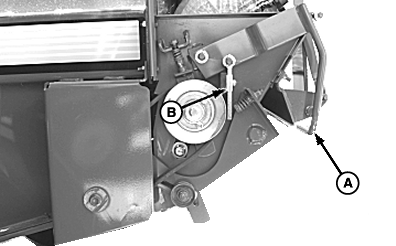
Net wraps on Rubber Drive RollTo correct net feeding or knife problems: 1. Disengage tractor PTO, shut off tractor engine and disconnect monitor-controller power plug from tractor convenience outlet.2. Open net wrap cover. 3. Pull lever (A) out and back to disengage roller brake pad (B). 4. Inspect brake pad and belt for wear and damage; replace if necessary. 5. Check brake roller torque. (See CHECKING AND ADJUSTING NET WRAP FEED ROLL BRAKE in this section.) 6. Check counterknife adjustment. (See ADJUSTING COUNTERKNIFE in this section.) |
|
OUO6085,00005B0 -19-07MAY07-1/3 |
|
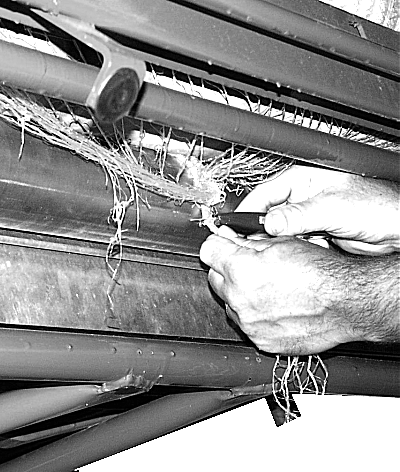
IMPORTANT: Do not cut net wrap material from rubber feed roll. Any knife cuts in the rubber roll covering may result in more frequent wrapping around the rolls and may require roller replacement. 7. Pull net wrap material away from the supply roll and steel roll. Cut net wrap material. 8. Remove and discard all of the wrapped material, including all strings, staples, etc. 9. Wipe off rubber drive roll and check for any sticky material. If necessary, roll may be washed with soap and water. NEVER use solvents to clean rubber roll. Allow rolls to dry before threading or wrappage may occur again. 10. Thread net wrap material. (See NET WRAP THREADING AND ROUTING in Preparing Baler for Net Wrap section.) NOTE: Only use 100% baby power (NON CORN STARCH) when dusting rubber drive roller. 11. If static electricity or dampness causes net wrap material to cling to the rolls, dust the rubber drive roller with baby powder. 12. If feed roll has been cut, repair if necessary. (See REPAIRING CUTS ON FEED ROLL in this section.) |
|
OUO6085,00005B0 -19-07MAY07-2/3 |
|
13.
Pull lever (A) out and down towards the front of machine to engage roller brake pad. Make sure brake pad (B) contacts belt pulley.
14. Close net wrap cover.
|
|
OUO6085,00005B0 -19-07MAY07-3/3 |