Adjusting Clearance Between Cutter Link Support and Twine Arm
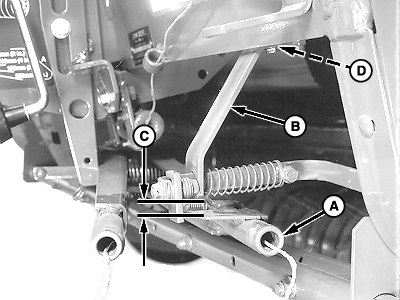
Stay out of the path of twine arms at all times when power to twine arms is ON. IMPORTANT: Do not operate twine arms with pickup in raised position, or damage to pickup teeth may occur. 1. Move twine arm (A) under cutter link support (B) as follows:
Electric Twine Wrap; 2. Measure clearance (C) between bottom edge of cutter link support (B) and top of twine arm strap. Clearance (C) should be within specifications. Specification
|
|
 CAUTION:
Twine arms can move unexpectedly. Keep hands out of twine arm path to avoid crushing. turn off power BEFORE servicing or adjusting twine arms or twine cutter mechanism.
CAUTION:
Twine arms can move unexpectedly. Keep hands out of twine arm path to avoid crushing. turn off power BEFORE servicing or adjusting twine arms or twine cutter mechanism.
OUO6085,00005B4 -19-28JUL06-1/2 |
4. Remove end play at front of cutter link support toward center of baler. Tighten screws. |
OUO6085,00005B4 -19-28JUL06-2/2 |