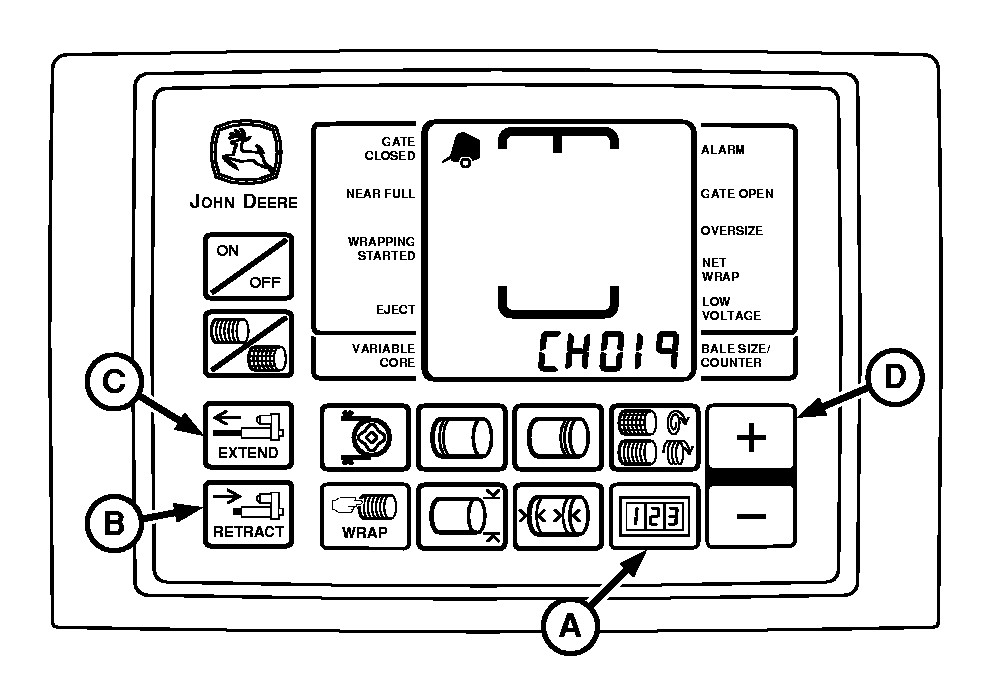
Testing Tractor Convenience Outlet Voltage (Channel 019)Complete the following check to determine if the convenience outlet provides adequate power to the BaleTrak ™ Pro system. IMPORTANT: Remove roll of net wrap material from baler if testing net actuator voltage. Otherwise, if PTO is engaged with net actuator extended, net will feed into empty baler and may cause damage to pickup or rotary feed system. 1. If testing net wrap actuator current, remove roll of net wrap material from baler. 2. Start tractor engine. 3. Press and hold COUNTER key (A) while turning monitor-controller ON. 4. Continue to hold COUNTER key and press PLUS key (D) until CH019 appears in the digital display. 5. Release COUNTER key and view voltage readout. 6. Using EXTEND key (C), extend twine or net actuator slightly. 7. Push and hold RETRACT key (B) until actuator stalls out in the fully retracted position. Note voltage displayed during first 4 seconds after stalling. Specification
|
|
|
Bale Trak is a registered trademark of Deere & Company | PP98408,00000C2 -19-14MAY09-1/2 |
|
8.
If voltage is less than specifications, install Convenience Outlet Kit AE50549. Only this kit should be used to provide a convenience outlet due to wire size, (12 ga), lack of splices, and a 30 amp circuit breaker included in this kit. When installing this kit, attach power and ground wires directly to battery terminal clamp bolts, only. (See TRACTOR CONVENIENCE OUTLET in Preparing the Tractor section.)
9. Turn monitor-controller OFF. Turn off tractor engine and remove key. Disconnect power cord to monitor when working around knife arm. Turning off tractor key will NOT turn off power to monitor. |
 CAUTION:
Convenience outlet is wired directly to battery. Turning off tractor key will not disconnect power to monitor.
CAUTION:
Convenience outlet is wired directly to battery. Turning off tractor key will not disconnect power to monitor.
PP98408,00000C2 -19-14MAY09-2/2 |