Adjusting Twine Arm Distance From Right Sidesheet -(458 and 458S) (Electric)IMPORTANT: Do not operate twine arms with pickup in raised position or damage to pickup teeth may occur. The twine cutter tension must be adjusted first before performing this procedure. NOTE: For 558 balers, the right-hand twine guide controls twine distance from the right end of bale. Because of this, the following adjustment procedure does not apply to these balers. 1. Lower pickup. 2. Turn tractor key to ON position. Do not start tractor engine. . 3. Turn monitor-controller ON 4. Move twine arms all the way to right-hand side of baler using monitor-controller EXTEND key. 5. Turn monitor-controller OFF. Turn tractor key to OFF position. Remove key. |
PP98408,000022A -19-22SEP09-1/2 |
|
6.
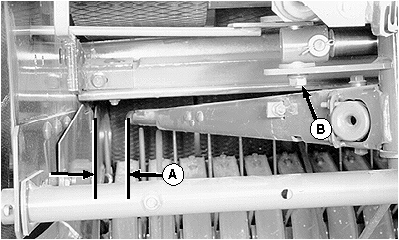
Measure sidesheet to twine arm distance (A). Distance should be within specifications with actuator fully extended and twine arm end play removed toward the rear.
Specification
7. To adjust, loosen nut (B) enough so twine arms can be moved by hand, but with some resistance. 8. Move twine arms toward sidesheet as far as possible, then move twine arms to the rear to obtain recommended distance (A). 9. Tighten nut (B) just enough to hold actuator bolt in position on twine arm when twine arm is moved to home position. 10. Turn tractor key to ON position. Do not start tractor engine. 11. Turn monitor-controller ON. 12. Move twine arms to the home position (actuator fully retracted) using monitor-controller RETRACTED key. 13. Set monitor-controller selector switch to OFF (centered) position. Turn tractor key to OFF position. Remove key. 14. Tighten nut (B) to specifications with twine arms in home position. Specification
15. Repeat Steps 3-6 to confirm correct distance from right-hand end of bale. Repeat Steps 7-13 as necessary. 16. Adjust twine cutter tension. (See ADJUSTING TWINE CUTTER TENSION in this section.) |
|
PP98408,000022A -19-22SEP09-2/2 |