Twine Electric Actuator Installation Adjustment
Stay out of the path of twine arms at all times when power to twine arms is ON. NOTE: 458 and 458S are illustrated for the following procedure. On the 558, actuator is installed on right-hand side. If electric actuator has been removed or replaced, or the twine cutter tension adjustment cannot be made by moving washers on the cutter strap, make the following adjustment: |
|
 CAUTION:
Twine arms can move unexpectedly. Keep hands out of twine arm path to avoid crushing. Turn off power to twine arms BEFORE servicing or adjusting twine arms or twine cutter mechanism.
CAUTION:
Twine arms can move unexpectedly. Keep hands out of twine arm path to avoid crushing. Turn off power to twine arms BEFORE servicing or adjusting twine arms or twine cutter mechanism.

PP98408,000022B -19-22SEP09-1/5 |
|
1.
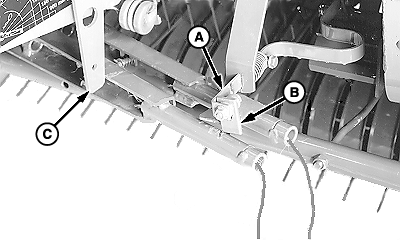
Adjust cutter strap (A) by putting two washers in front of contact tab (B) and four washers behind contact tab (B). Make sure twine arm stop (C) is in the down position.
2. Turn tractor key to ON position. Do not start tractor engine. Set monitor-controller selector switch to TWINE symbol to turn monitor-controller ON.
|
|
PP98408,000022B -19-22SEP09-2/5 |
|
3.
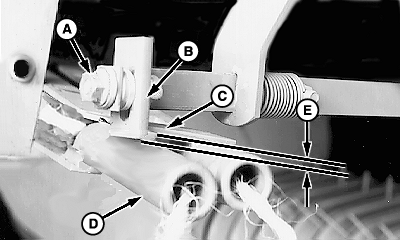
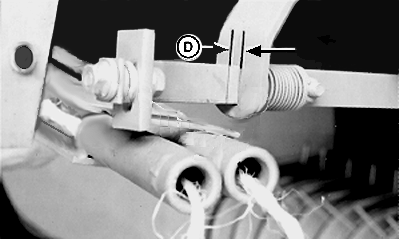
Press monitor-controller RETRACT key and move twine arms until twine arm (D) lightly contacts tab (B) and strap (C).
4. Set monitor-controller selector switch to OFF (centered) position. Turn tractor key to OFF position. Remove key. 5. Loosen nut (A) and adjust tab (B) to obtain dimension (E) between bottom edge of tab (B) and bottom side of strap (C) according to specifications. Keep tab (B) vertical and tighten nut (A). Specification
6. Turn tractor key to ON position. Set monitor-controller selector switch to TWINE symbol to turn monitor-controller ON. 7. Move twine arms completely forward using monitor RETRACT key. 8. Set monitor-controller selector switch to OFF (centered) position. Turn tractor key to OFF position. Remove key. 9. Check overlap dimension (E). Front twine arm must pass under tab (B). If necessary, adjust tab (B). Light contact between tab (B) and front twine arm (D) is acceptable. 10. Turn tractor key to ON position. Set monitor-controller selector switch to TWINE symbol to turn monitor-controller ON. 11. Move twine arms behind twine cutter using monitor-controller EXTEND key. 12. Set monitor-controller selector switch to OFF (centered) position. Turn tractor key to OFF position. Remove key. |
|
PP98408,000022B -19-22SEP09-3/5 |
|
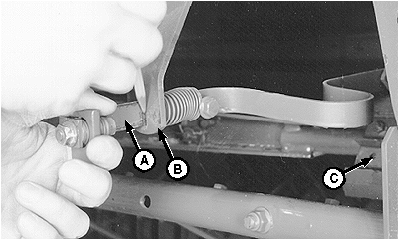
13. Pull cutter strap (A) gently forward until knife (C) contacts hex anvil. Remove slack, but DO NOT deform cutter strap. 14. Mark along cutter strap (A) at support (B), as shown.
|
|

PP98408,000022B -19-22SEP09-4/5 |
|
|
|
|
|
|
|
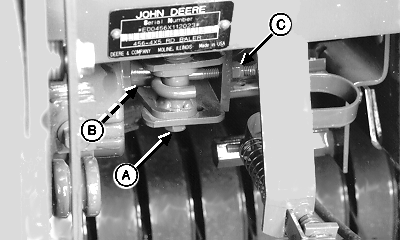
15.
Loosen cap screw (A and B).
16. Loosen J-bolt nut (C). 17. Move cap screw (A) to end of slot toward actuator. 18. Tighten cap screws (A and B) just enough so actuator pivot can be moved by hand, but with some resistance. 19. Turn tractor key to ON position. Set monitor-controller selector switch to TWINE symbol to turn monitor-controller ON. 20. Using monitor-controller RETRACT key, move twine arms to home position. 21. Set monitor-controller selector switch to OFF (centered) position. Turn tractor key to OFF position. Remove key. 22. Tighten J-bolt nut (C) to obtain dimension (D) between mark on cutter strap and strap support according to specifications. Specification
23. Tighten cap screw (A) to specifications. Specification
|
24. Tighten cap screw (B) to specifications. Specification
25. Turn tractor key to ON position. Set monitor-controller selector switch to TWINE symbol to turn monitor-controller ON. 26. Using monitor-controller RETRACT key, cycle twine arm to home position (actuator fully retracted). 27. Set monitor-controller selector switch to OFF (centered) position. Turn tractor key to OFF position. Remove key. 28. Check twine cutter dimension (D). 29. If dimension (D) is less than specified, loosen cap screws (A) and (B). Tighten J-bolt nut (C) until dimension (D) is obtained. Tighten cap screws (A) and (B). If dimension (D) is more than specified, loosen cap screws (A and B). Loosen J-bolt nut (C) until dimension (D) is obtained. Tighten cap screws (A) and (B). |
PP98408,000022B -19-22SEP09-5/5 |