Install PTO Slip Clutch Alert Sensor and Driveline

1. If baler is equipped with regular pickup proceed to Step 14.

If baler is equipped with MegaWide™ Plus pickup proceed to Step 2.

PP98408,000027D -19-19OCT09-1/10


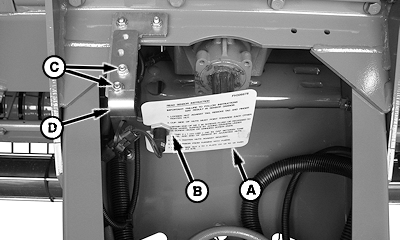
NOTE: Tag provides reference instructions to adjust PTO sensor clearance and tightening procedure.

2. Remove tag (A) by loosening nut (B).

3. Remove and retain hardware (C) and place bracket with sensor (D) inside of tongue.


A-Tag
B-Nut
C-Hardware
D-Bracket with Sensor

E57480

540 RPM Bracket Assembly Shown

PP98408,000027D -19-19OCT09-2/10


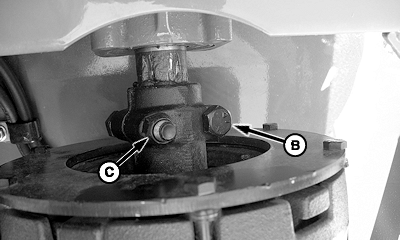
IMPORTANT: Cap screw heads (B) lead as driveline rotates counterclockwise when looking toward rear of baler.

4. Install PTO driveline (A). Fasten with two 1/2 x 2-3/4 in. cap screws and lock nuts (C) (included with driveline).


A-PTO Driveline
B-Cap Screws (2 used)
C-Lock Nuts (2 used)

E57639
E57682

PP98408,000027D -19-19OCT09-3/10


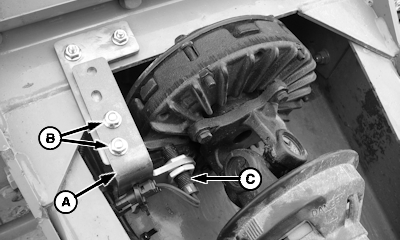
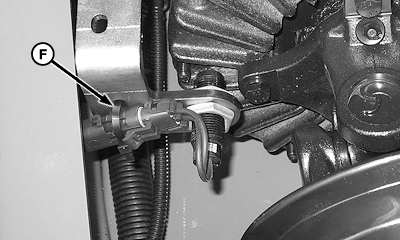
IMPORTANT: Ensure wiring harness to sensor (C) is clear of slip clutch, damage to wiring harness may occur. Retain harness to hoses using tie bands.

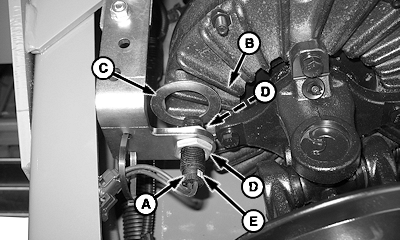
5. Install bracket (A) and hardware (B). Position sensor (C) side-to-side to clear clutch bolts (D) and yoke ears (E) by at least 2 mm (0.08 in.). Tighten hardware (B) after sensor is positioned.


A-Bracket
B-Hardware
C-Sensor
D-Clutch Bolts
E-Yoke Ears

E57788

540 RPM Bracket Assembly Shown

E57641

Sensor Clearance Shown

PP98408,000027D -19-19OCT09-4/10


NOTE: Cup sides of sensor nuts (D) must point towards each other.

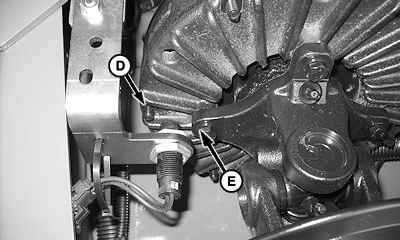
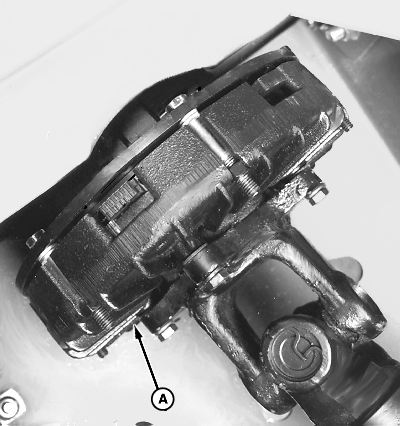
6. Adjust end of sensor (A) 2 ± 1 mm (0.080 ± 0.040 in.) from fins (B) on PTO clutch.

NOTE: End of sensor is a magnet. Washer/gauge may drag on magnet creating false sensor-to-fin reading during checks.

  • Place a 2 mm (0.080 in.) washer or feeler gauge (C) against end of sensor.
  • Advance sensor with washer/gauge (C) toward clutch fin until gauge just makes contact.
  • Tighten nuts (D) finger tight.

IMPORTANT: Overtightening sensor nuts will damage (crack) sensor housing.

7. To tighten sensor: Hold sensor at location (E) with pliers. Tighten nut (D) 2-3 flats, or 1/3-1/2 turn, or 6 N·m (4.5 lb.-ft.).

8. Verify sensor is not damaged after tightening nuts.

  • Disconnect sensor from wiring harness.
  • Connect multimeter leads to sensor connector.
  • If multimeter reads approximately 3000 Ohms, sensor is good.
  • If multimeter reads zero, sensor is bad. Replace sensor.
  • Connect sensor to wiring harness.

9. Recheck 2 ± 1 mm (0.080 ± 0.040 in.) clearance between clutch fins and sensor while gently prying PTO clutch forward to simulate PTO driveline thrust loads.

Hold PTO clutch forward and perform the following:

  • If 1 mm (0.040 in.) gauge does not pass between clutch fin and sensor, repeat Steps 6-9 to obtain proper clearance.
  • If 1 mm (0.040 in.) gauge passes between clutch fin and sensor, clearance is acceptable.
    E57642
    E57643


    A-Sensor
    B-Fins
    C-Washer or Feeler Gauge
    D-Nuts
    E-Location (Pliers)
    F-Tie Band

PP98408,000027D -19-19OCT09-5/10


  • If 3 mm (0.12 in.) gauges passes between clutch fin and sensor, repeat Steps 6-9 to obtain proper clearance.
10.

Tighten tie band (F) around wiring harness connector and secure to bracket.

PP98408,000027D -19-19OCT09-6/10


    NOTE: PTO and pickup sensor values are set at factory.

    11.

    Verify PTO and pickup sensor values are activated using the following procedure:

    • Turn tractor key to ON position. Do not start tractor.
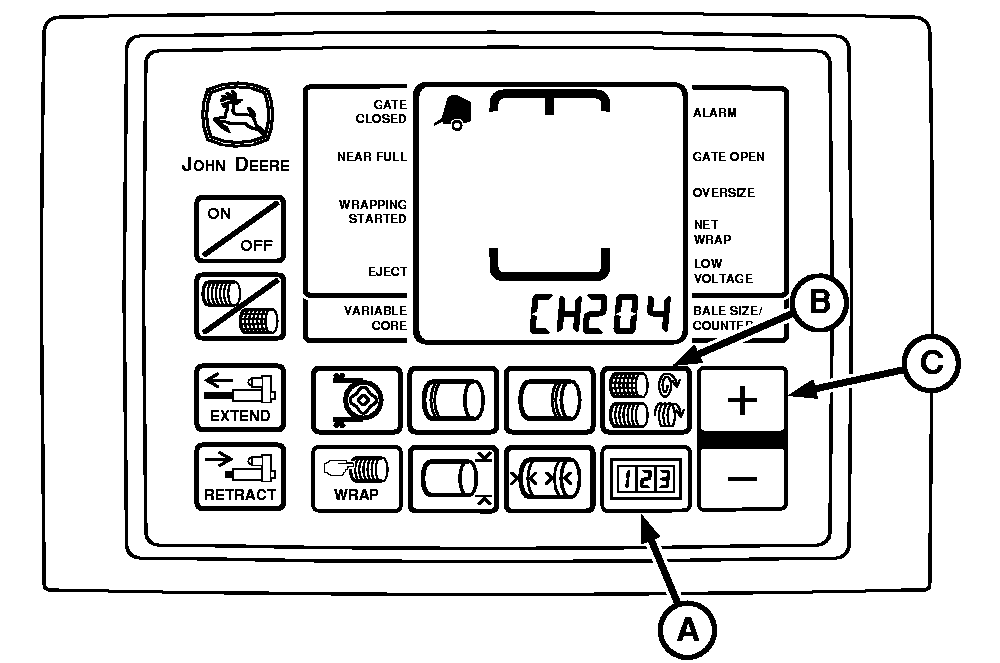
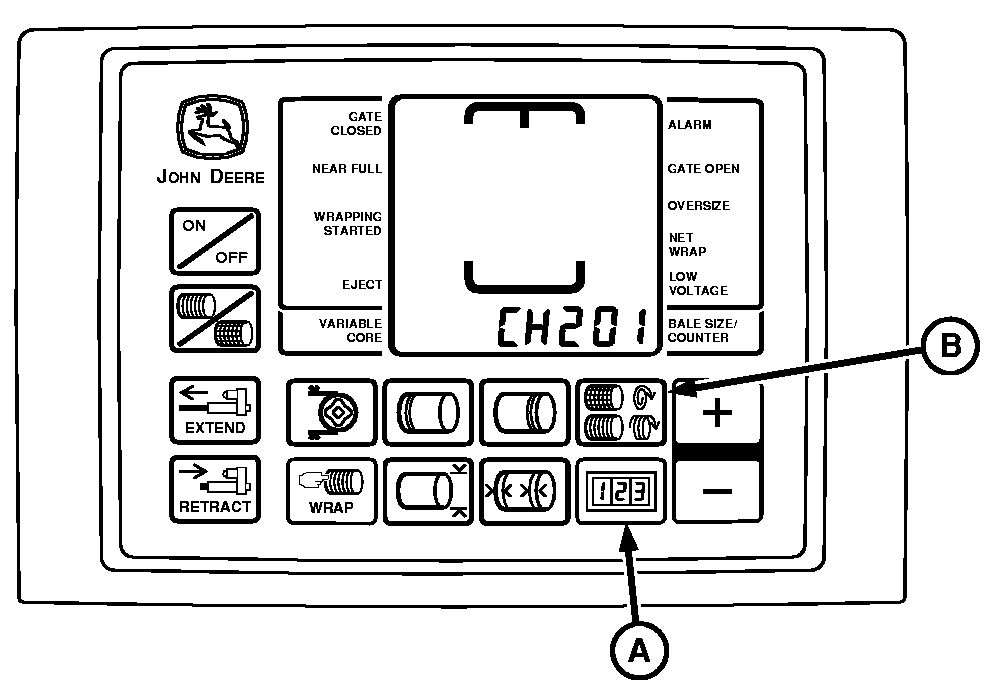
    • Press and hold both COUNTER key (A) and NUMBER OF WRAPS key (B) while turning monitor-controller ON. CH201 should be displayed.
    • Release both keys. Baler model is displayed.
    • Press and hold COUNTER key (A) and press the PLUS key (C) until CH204 is shown in the display.
    • Release COUNTER key (A).
    • Press PLUS key (C) to change display to 540 PTO speed.
    • Press and hold COUNTER key (A) and press the PLUS key (C) until CH205 is shown in the display.
    • Press PLUS key (C) to change display to 310 .
    • Press and hold COUNTER key (A) and press the PLUS key (C) until CH206 is shown in the display.
    • Press PLUS or MINUS key to change display to 24 (number of fins on slip clutch).
    • Press and hold COUNTER key (A) and press the PLUS key (C) until CH207 is shown in the display.
    • Press PLUS or MINUS key to change display to 21 (number of teeth on tone wheel).
    • Turn monitor-controller OFF.
    • Turn tractor key to OFF position. Remove key.
    E55069


    A-COUNTER Key
    B-NUMBER OF WRAPS Key
    C-PLUS Key

PP98408,000027D -19-19OCT09-7/10


      NOTE: The twine, net wrap, slip clutch alert, and optional variable core features will not operate correctly unless the model number displayed on monitor-controller matches baler model number.

      12.

      Verify correct baler model program using the following procedure:

      • Turn tractor key to ON position. Do not start tractor.
      • Press and hold COUNTER key (A) and NUMBER OF WRAPS key (B) while turning monitor-controller ON. CH201 should be displayed.
      • Release both keys. Baler model is displayed.
      • Press PLUS or MINUS key to change to desired model.
      • Turn monitor-controller OFF to enter setting into memory.
      • Turn monitor-controller ON to verify baler model number. Baler model is displayed for approximately 2 seconds. If displayed baler model number is incorrect, repeat procedure.
      • Turn tractor key to OFF position and remove key.
      13.

      To check sensor output and verify proper operation, use the following procedure:

      • Start tractor, operate at low, but stable, rpm and engage PTO.
      • Press and hold COUNTER key while turning monitor-controller ON.
      • Continue to hold COUNTER key and press PLUS key until CH016 appears in the digital display.
      • Release COUNTER key and PTO speed is displayed. This speed readout should be stable and not vary by more than 5 rpm.
      • Press and hold COUNTER key and press the PLUS key until CH017 appears in the digital display.
      • Release COUNTER key and pickup drive speed is displayed. This speed should be stable and not vary by more than 5 rpm.
      • If there is a variation in either sensor output, shut off tractor and remove key. Adjust appropriate sensor closer to clutch fins or tone wheel, but not closer than 1 mm (0.040 in.). Then recheck.
    E52456


    A-COUNTER Key
    B-NUMBER OF WRAPS Key

PP98408,000027D -19-19OCT09-8/10


        • With tractor PTO speed of 540 rpm, pickup sensor should read approximately 310 rpm. If pickup sensor rpm is greater than PTO clutch rpm, then orange and brown wires are reversed at the harness connector.

          Example of a problem: Monitor displays "slipping". (See SLIP CLUTCH ALERT in Troubleshooting section of Operator's Manual).

          If there is a variation in this output, readjust sensors closer to tone wheel or clutch fins.

        Turning PTO Speed Sensor ON and OFF:

        • PTO speed sensor can be turned OFF or ON by accessing channel 204.
        • Feature can be turned ON by changing value to 540 rpm.
        • Entire slip clutch alert feature can be turned OFF by changing value to 0.

        Turning Pickup Speed Sensor ON and OFF:

        • Pickup rpm sensor can be turned OFF and ON by accessing channel 205.
        • Feature can be turned ON by changing value to 310 rpm.
        • Pickup rpm sensor can be turned OFF by changing value to 0.
        • Turning OFF the pickup sensor on channel 205 and turning ON PTO sensor on channel 204 still allows automatic speed compensation during wrapping cycle.

PP98408,000027D -19-19OCT09-9/10


          IMPORTANT: Tie band wiring harness to hoses, as needed, to keep harness away from rotating slip clutch.

          IMPORTANT: Cap screw heads (B) should lead as driveline rotates counterclockwise when looking toward rear of baler.

          NOTE: Adjust cap screws evenly.

          14.

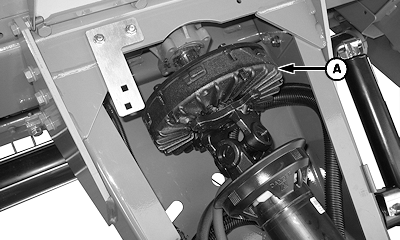
          Install slip clutch and driveline (A). Fasten with two 1/2 x 2-3/4 in. cap screws (B) and lock nuts (C) included with driveline.


          A-Slip Clutch and Driveline
          B-Cap Screws (2 used)
          C-Lock Nuts (2 used)

    E57787

    540 RPM Driveline Shown

    E57682

PP98408,000027D -19-19OCT09-10/10