Final Adjustment of Net Wrap Switch—In Field
-
Make level firm bale in chamber with monitor-controller in net mode. Stop tractor before auto wrap cycle begins.
-
Set number of wraps of net to 3.
-
With PTO running at rated speed, press WRAP key. After five seconds, turn monitor box switch to OFF position.
 CAUTION: Shut off tractor PTO, engine, place in park, and remove
key.
CAUTION: Shut off tractor PTO, engine, place in park, and remove
key. -
Unhook harness at tractor.
-
Open shield to access cut-off switch. Net must hold the actuator flap in a horizontal position.
NOTE: Flap spring must be forward (towards front of baler) on its anchor.
-
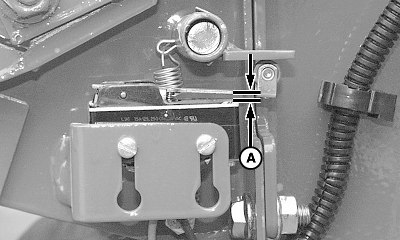
E49026-UN-18OCT00Style “A”
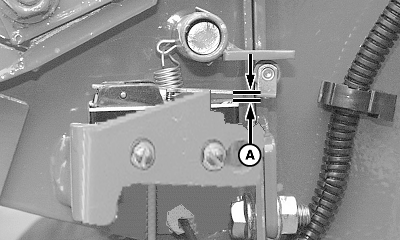
E79992-UN-22SEP15Style "B"
A - Clearance
Adjust switch to ensure roller arm-to-flap clearance (A) is within specifications.Item Measurement Specification Switch Arm-to-Body of Switch Clearance (A) 0.2—1 mm (0.008—0.040 in.) -
Reconnect wire harness.
-
Start tractor. Turn on PTO. Then Press WRAP key. Net must cycle and cut off normally.
IMPORTANT: Failure to press WRAP key will result in continuous feeding of net and no cut-off.
-
Set monitor to number of wraps desired.
|
OUO6064,0001588-19-20150921 |