Net Wrap and B-Wrap Feature (Channel 203)
(Turning
On and Off)
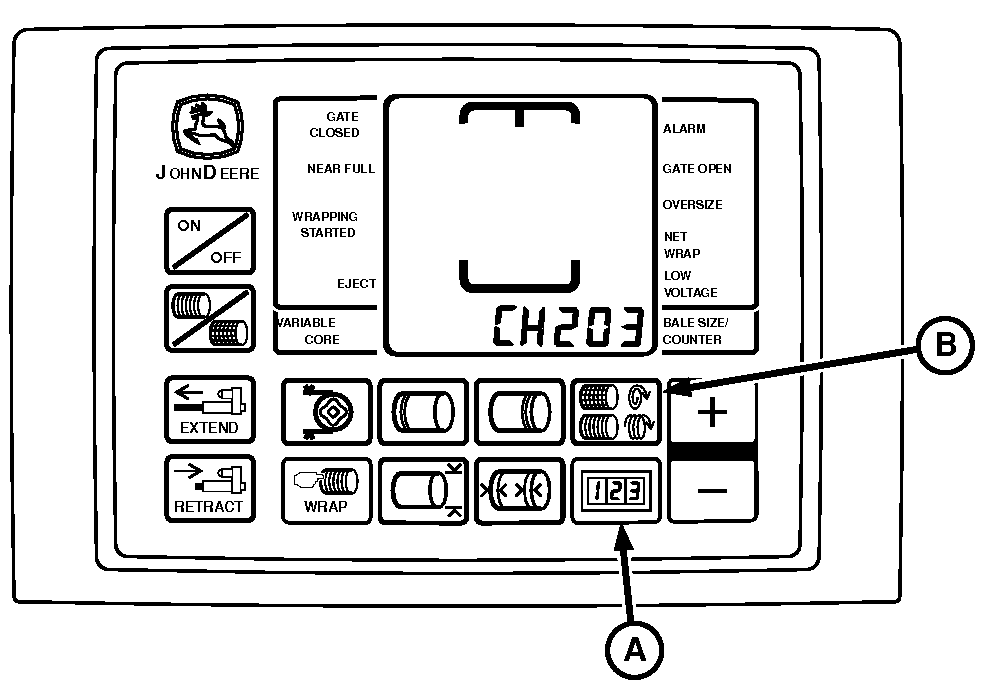
E57096-UN-08MAY09
A - COUNTER Key
B - NUMBER OF WRAPS Key
The net wrap feature can be turned OFF, ON, or switched to B-Wrap mode by accessing Channel 203.
NOTE: The net wrap, B-Wrap, twine, slip clutch alert, and optional variable core features will not operate correctly unless the model number displayed on monitor-controller matches baler model number.
NOTE: If both net wrap and twine features are turned OFF, the monitor will consider the twine feature ON.
Turning Feature On and Off:
-
Turn tractor key to ON position. Do not start tractor.
-
Press and hold both COUNTER key (A) and NUMBER OF WRAPS key (B) while turning monitor-controller to ON. CH201 must be displayed.
-
Release both keys. Baler model is displayed.
-
Press and hold COUNTER key (A) and press the PLUS key until CH203 is shown in display.
-
Release COUNTER key (A).
-
Press PLUS or MINUS key to change displayed value to 0 (net OFF), 1 (net ON), or b1 (B-Wrap ON).
IMPORTANT: Bale diameter must be set to 66 in and push bar disengaged to operate B-Wrap.
-
Turn monitor-controller OFF to enter setting into memory.
-
Turn monitor-controller ON to verify baler model number. Model number is displayed approximately 2 seconds. If displayed baler model number is incorrect, see BALER MODEL PROGRAM (CHANNEL 201) in this section.
-
Turn tractor key to OFF position and remove key.
|
OUO6064,00015C7-19-20150925 |