Check Front Sheet-to-Rubber Roll Clearance
-
Open net wrap cover. Ensure that brake lever is engaged.
-
Remove net material.
-
Turn tractor key to ON position. Turn monitor-controller ON.
-
Ensure that monitor is in NET mode. Turn monitor OFF.
-
E52520-UN-26JUN03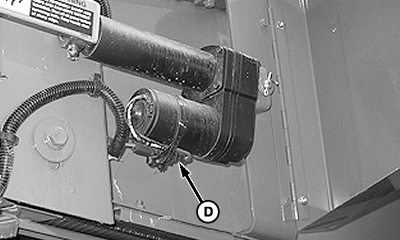
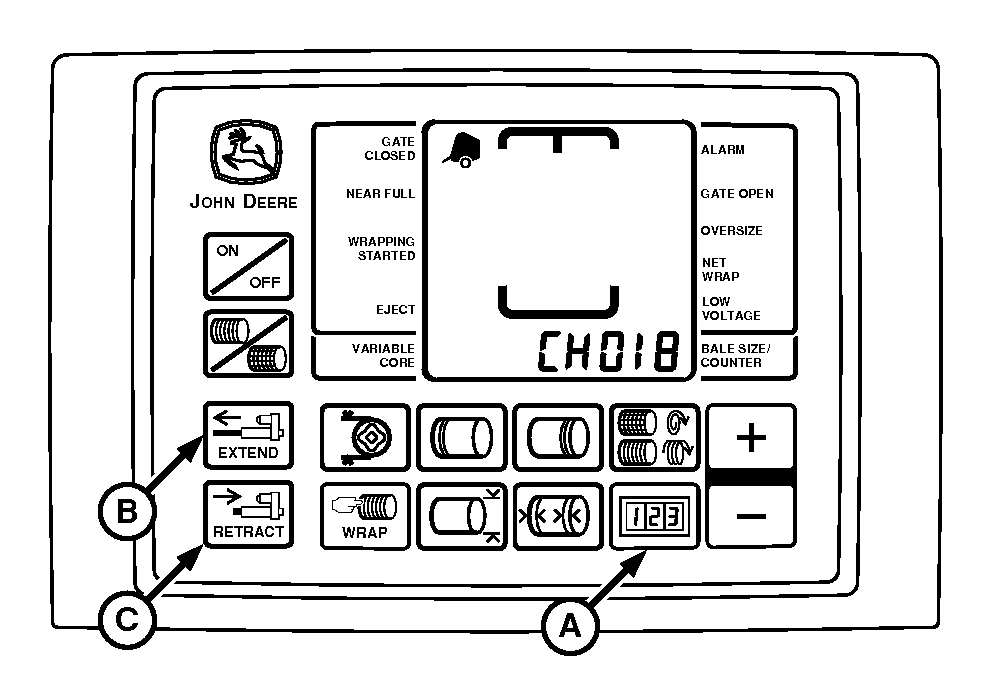
E80107-UN-29SEP15A - COUNTER Key
B - EXTEND Key
C - RETRACT Key
D - Wire Harness Connector
Press and hold COUNTER key (A) and press PLUS key to advance to CH018. Release COUNTER key (A). -
Press and hold EXTEND key (B) to move counterknife to the up position.
-
 CAUTION: To avoid personal injury from unexpected knife movement,
disconnect net wrap actuator wire connector or power plug when performing
adjustment or working in area.
CAUTION: To avoid personal injury from unexpected knife movement,
disconnect net wrap actuator wire connector or power plug when performing
adjustment or working in area.Turn monitor-controller selector switch to OFF. Turn tractor key to OFF position. Remove key. Disconnect monitor-controller power plug from power source or disconnect plug at net wrap wire harness connector (D).
-
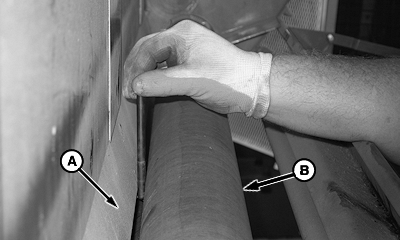
E57351-UN-19JUN09A - Front Sheet
B - Rubber Roll
Check dimension between front sheet (A) and entire length of rubber roll (B) with drill bits.Item Measurement Specification Front Sheet-to-Rubber Roll Distance 3—6 mm (0.12—0.24 in.) -
If dimension is not within specification, bend front sheet to obtain 3—6 mm (0.12—0.24 in.) clearance. (See your John Deere dealer.)
|
OUO6064,0001612-19-20150929 |