Slip Clutch Alert PTO Speed Sensor
(Channel 204) (Turning
On and Off)
IMPORTANT: The following procedure is not used on a 459 and 559 Baler with a Regular pickup.
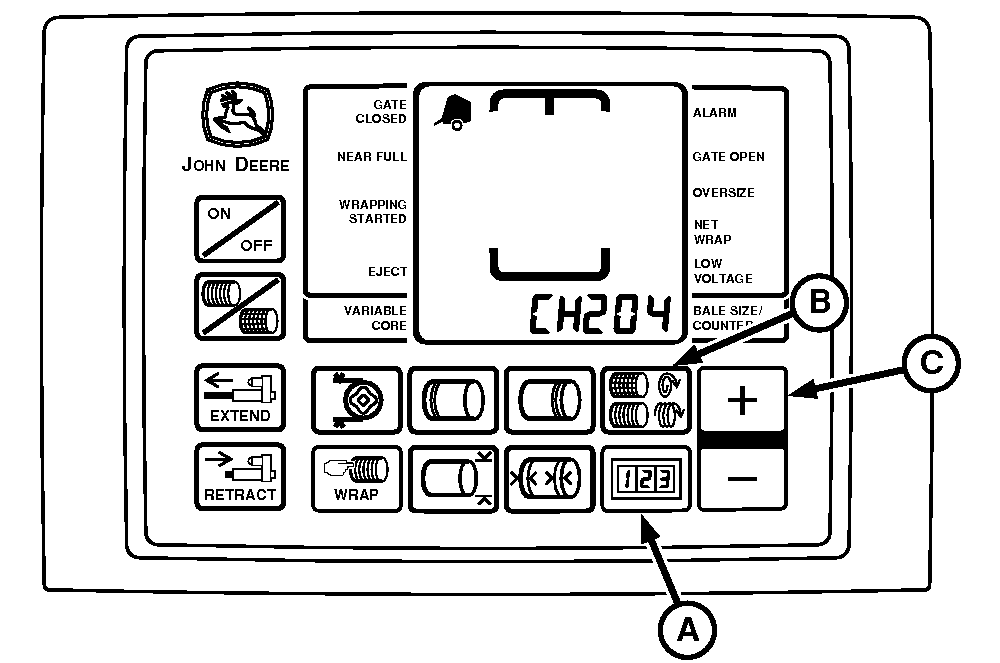
E55069-UN-25APR07
A - COUNTER Key
B - NUMBER OF WRAPS Key
C - PLUS Key
PTO speed sensor can be turned OFF or ON by accessing channel 204.
Entire slip clutch alert feature can be turned off by changing value to 0.
NOTE: Both channels 204 and 205 must be turned ON to use speed compensation and slip clutch alert features.
Turning Feature On and Off:
-
Turn tractor key to ON position. Do not start tractor.
-
Press and hold both COUNTER key (A) and NUMBER OF WRAPS key (B) while turning monitor-controller to ON. CH201 must be displayed.
-
Release both keys. Baler model is displayed.
-
Press and hold COUNTER key (A) and press the PLUS key (C) until CH204 is shown in display.
-
Release COUNTER key (A).
-
To turn PTO speed sensor ON, press PLUS key (C) until baler PTO speed 540 is shown in display. To turn PTO sensor OFF, press the PLUS key (C) until 0 value is displayed.
-
Release PLUS key (C).
-
Turn monitor-controller OFF to enter setting into memory.
-
Turn monitor-controller ON to verify baler model number. Model number is displayed approximately 2 seconds. If displayed baler model is incorrect, see BALER MODEL PROGRAM (CHANNEL 201) in this section.
-
Turn tractor key to OFF position and remove key.
|
PP98408,0000F0C-19-20130207 |